

Search
One search finds work items, wiki pages, projects, people and bots, and views. In the interface it lives in the command palette (⌘ / Ctrl+K); over the API it is GET /api/v1/search. Both search the same way and leave out the same items, pages, projects and accounts; the palette asks for fewer hits per kind (8) and shows people and bots only to org admins (see below), and it leaves the archive out, except an item whose key you type. The browser never talks to the search engine itself: every search goes through werkbuch, which decides what you may see.
What is found
| Kind | Found by | A hit in the palette opens |
|---|---|---|
| Work items | Key, title, the text of the description and of the comments | The item page |
| Wiki pages | Title, text | The page in the wiki |
| Projects | Identifier, former identifiers, name, description | The item list of the project |
| People and bots | Name, handle | The settings People or Bots (org admins only, see below) |
| Views | Name | The view |
Every word you type has to occur; the last word may be the start of a word, so kontakt finds "Kontaktformular sendet doppelt". From five letters on, a small typo in a title, a description or a comment is forgiven (kontaktfromular), never in keys, identifiers and handles. A hit in the key counts more than one in the title, one in the title more than one in the description, and one in the description more than one in a comment; among equal hits, the item changed last comes first (a new comment does not count as a change of the item, so it does not move the item up).
A word of a comment finds the item the comment belongs to; the search reads the comments of an item in the order they were written, up to 64 KB of text per item. A comment that is edited or deleted changes the search a moment later, like any other change; reactions change nothing.
A wiki page is found by its title and its text, up to 64 KB of text per page; a hit in the title counts more than one in the text, and among equal hits the page changed last comes first. Saving, moving and deleting a page change the search a moment later.
A reference to an item inside a page does not count for the search: the page is not found by the key of the item it refers to, because a key written as a reference stands in the text without its letters. To see which pages name an item, open the item: its section Wiki pages lists them (see wiki).
People and bots are found only while their account is active. Views are searched by every word of their name, case and accents aside, straight in the database: a new view is found at once.
Who finds what
- Only what you may see. Items, pages and projects come only from projects you may see, decided at the moment of the search, not when the item was indexed. Whoever is removed from a private project, or whose project turns private, finds none of its items and pages from then on, even before the index catches up. An item or page that was deleted, or whose project is being deleted, never shows up.
- Archive as in lists. Without
include_archived, the search leaves out archived items and the items, pages and projects of archived projects, like every item list. The palette always searches this way. - A key jumps. A query in the form of a key, such as
WEB-47orweb-47, names its item inkey_matchand puts it first, archived or not. A former identifier works too: after WEB became SITE,WEB-47still finds SITE-47. This only happens for an item you see; the key of any other item answers exactly like a key that does not exist. - People. The API returns people and bots to every account, as the list of accounts does. The palette shows them only to org admins, because a hit leads into the settings of people and bots, which only org admins open.
- Views are found by every account; every account may read every view.
Command palette
⌘ / Ctrl+K opens the palette on every screen. / opens it too, except in item lists, where / searches the title of the list instead. The button Search … at the top of the sidebar, the search icon of the folded sidebar and of the bar on a phone, and Search on the page "not found" open it as well.
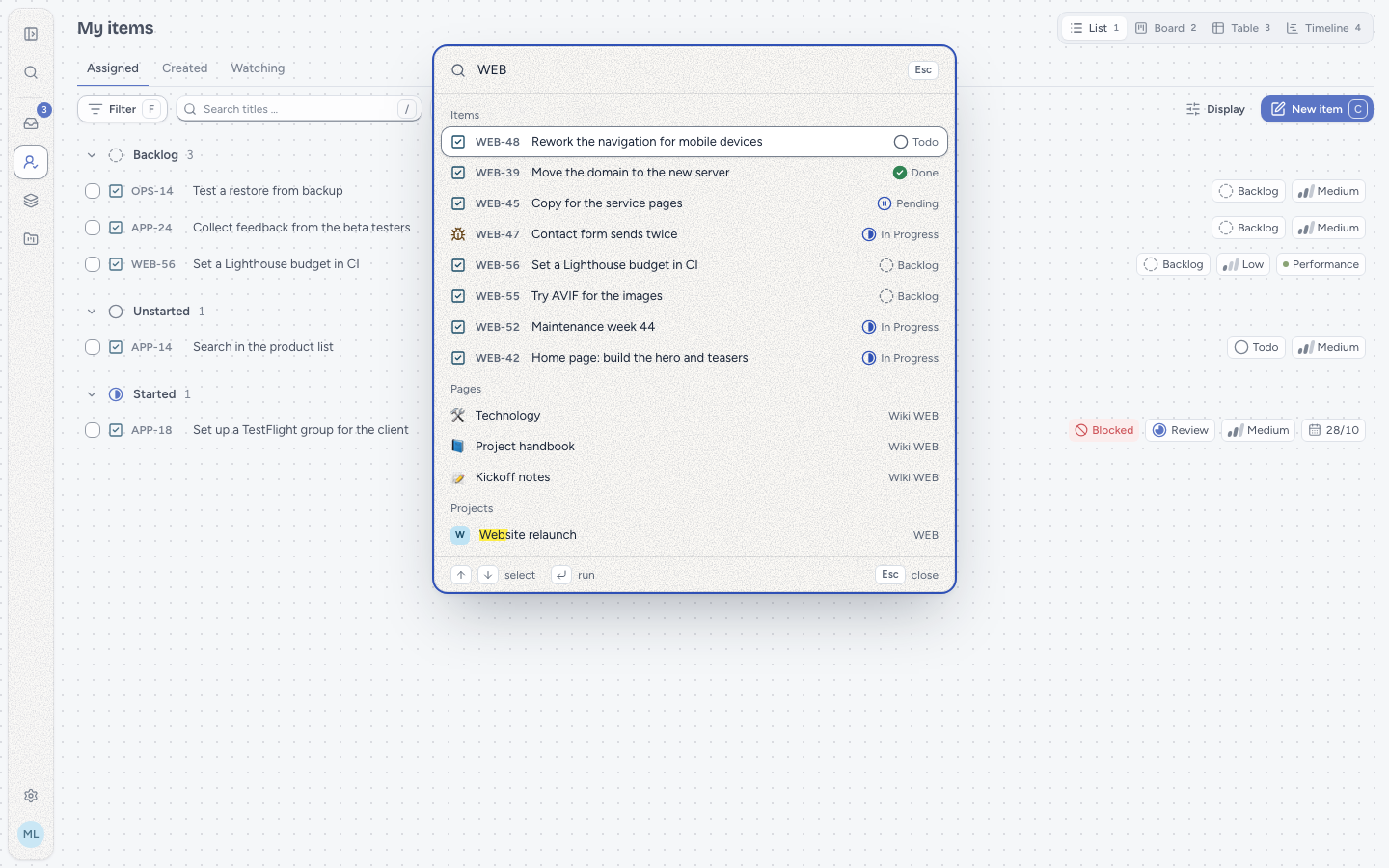
What you type first matches the commands (by their name, group and keywords), then the search results follow in sections: Items (up to 8), Pages, Projects, People and Views (up to 4 each). A page shows its emoji, title and project and opens in the wiki. The search starts 150 ms after your last key; while it runs, the palette says "Searching …". ↑ and ↓ choose a hit, ↵ opens it, Esc closes the palette.
A typed key such as WEB-47 puts the items first, with Open WEB-47 at the top: ↵ jumps there even before the search has answered. When the key belongs to an item you see under a former identifier, that item leads instead.
Without a hit, the palette says so and gives two tips: commands are found by their name, and a key jumps straight to the item. When the search does not answer, the palette shows the reason with Try again; a typed key still jumps, because the item page resolves the key itself.
The dialog Add relation (R on an item) finds the other item through the same search (items only, up to 20), keys included. It suggests nothing before you type. # in a text finds items and pages the same way (see rich text).
All keys of the palette are on the keyboard page.
REST
GET /api/v1/search needs a token with read (or the session of the interface); tokens, errors and limits are explained on the page REST API.
| Parameter | Value |
|---|---|
q | Required. What to search for, 1 to 255 characters after trimming. |
types | The kinds to search: items, pages, projects, people, views, separated by commas (types=items,projects) or as a list (types[]=items). All five when left out; a list without any kind (types=,) is a 422. |
limit | Hits per kind, 1 to 50; 20 by default. |
include_archived | 1 or true also searches archived items and archived projects with their items and pages. |
type_id | Only items of these types (ULIDs). |
state_category | Only items whose state is in one of these categories: backlog, unstarted, started, completed, canceled. |
assignee_id | Only items assigned to one of these accounts (ULIDs), or none alone: items without an assignee. |
label_id | Only items with one of these labels (ULIDs). |
The last four narrow the items only, never pages, projects, people or views. Each takes one value, several separated by commas or a list; several values of one parameter mean any of them, several parameters must all hold. Any other parameter is ignored. There are no pages: ask for a larger limit or a narrower q. Over MCP the tool search takes the same parameters, lists as JSON lists.
curl -H "Authorization: Bearer <token>" \
  "https://werkbuch.example.com/api/v1/search?q=kontakt&types=items,projects&limit=5"
The answer always has all six keys; kinds you did not ask for are empty lists. Items come in the short form of lists, without description, description_json and values_markdown, pages in the short form of the tree, without content and content_json; projects, people and views have the form of their own endpoints.
{
  "data": {
    "items": [
      {
        "id": "01m6akyecnp503vn6jmb8sp249",
        "key": "WEB-47",
        "title": "Kontaktformular sendet doppelt",
        "state_id": "01m6akx71bcm10xw328kxkw7ak",
        "archived_at": null,
        "…": "…"
      }
    ],
    "pages": [],
    "projects": [],
    "people": [],
    "views": [],
    "key_match": null
  }
}
key_match is the ULID of the item a key-shaped q names, when you see it and it passes the filters of items, else null. It is only set when types includes items, and that item then stands first in items.
Errors
A query that does not fit is a 422 with every problem at once, at q, types, limit, include_archived or one of the filters (a value that is no ULID, an unknown category, none next to an account):
{
  "type": "urn:werkbuch:problem:validation_failed",
  "title": "Validation failed",
  "status": 422,
  "detail": "The input is not valid.",
  "reason": "validation_failed",
  "errors": {
    "q": ["Enter something to search for."],
    "limit": ["A whole number from 1 to 50."]
  }
}
When the search engine does not answer, the search is a 503 rather than an empty list, so a missing hit never looks like "nothing found":
{
  "type": "urn:werkbuch:problem:search_unavailable",
  "title": "Service unavailable",
  "status": 503,
  "detail": "The search is not available right now. Try again in a moment.",
  "reason": "search_unavailable"
}
A token without read gets a 403, a request without an account a 401. Messages come in the language of the account.
Operation
werkbuch searches with Meilisearch through Laravel Scout. Locally, DDEV runs it as the service meilisearch (see Development); in the Docker Compose stack it is the service meilisearch (see Setup).
| Variable | Meaning |
|---|---|
SCOUT_DRIVER | meilisearch; null turns the index off, and searches then find nothing but a typed key. |
MEILISEARCH_HOST | Address of Meilisearch as werkbuch reaches it, for example http://meilisearch:7700. |
MEILISEARCH_KEY | A key that may create, fill and configure indexes (the master key or an admin key). It never leaves the server. |
SCOUT_PREFIX | Put in front of the index names work_items, pages, projects and users; empty for the app. Two installations on one Meilisearch need different prefixes. |
The index follows the events. Every change in werkbuch writes an event; a consumer on the queue search updates the index from it. A queue worker therefore has to listen on search, and a change shows up in the search a moment later. Changes that touch many items at once (a new identifier for a project, a changed workflow, a deleted label) rebuild the documents of those items in a job of their own on the same queue; deleting a wiki page removes its whole subtree from the index in one go.
Commands.
php artisan app:search-sync      # sends the settings of the indexes to Meilisearch (after an update changed them)
php artisan app:search-import    # builds the four indexes again from the database and swaps them in
app:search-import is the first start and the repair: it builds each index again from the database beside the one the search reads (work_items_next next to work_items, with the settings), then swaps the two and deletes the old one. The search keeps answering from the old documents meanwhile; if the build fails, the old index stays and the new one is deleted. Changes made while an index is being built first go into the old one; at the end, the import writes everything that changed since shortly before its start once more, so nothing is lost with the swap. It only touches indexes that start with SCOUT_PREFIX; other indexes on the same Meilisearch stay. In DDEV, prefix both with ddev artisan.
After an update that changes what the index holds, run app:search-sync once: without it, Meilisearch does not search the new fields. The update that made comments searchable is one of them; run app:search-import after it as well, so that the comments written before the update get into the index. The update that brought the wiki adds the index pages: until app:search-sync has created it, every search without types answers 503, and app:search-import puts the existing pages into it.
When Meilisearch is down, the search answers 503 and the palette says "The search did not answer" with Try again; jumping to a typed key keeps working. Nothing is lost on the way: the consumer tries every event up to 8 times, with pauses of 10 seconds, 1, 5 and 15 minutes and then one hour, about 3 hours 20 minutes in all. After that, the job lands in failed_jobs and werkbuch reports which event the search gave up on. Run app:search-import once Meilisearch is back, and the index is complete again.
In the Docker Compose stack, every start of werkbuch runs app:search-sync and imports when an index is empty or lacks fields of the new version, so an update needs nothing by hand (Operations).
Meilisearch keeps its indexes in memory-mapped files and wants memory to spare: it takes up to two thirds of the RAM while it indexes. The minimum requirements of the stack and how to cap the memory of Meilisearch are under Setup.