

Wiki
Every project has a wiki: a tree of pages for what the team needs to know, such as agreements, processes and technology. A page has a title, an emoji, a text in the full editor, who created it and who changed it last. Pages save on their own, keep older versions, can be referred to from items and comments, and are found by the search. There is no live collaboration: two people writing on the same page at once get a conflict that loses nobody's text.
The wiki of a project lives under /projects/WEB/wiki. You reach it through Wiki on the card of the project, the tabs Items · Wiki · Templates · Settings below the header of each part, Open wiki … in the command palette, and, for a starred project, Wiki below it in the sidebar. Without a page open, it shows the six pages that changed last.
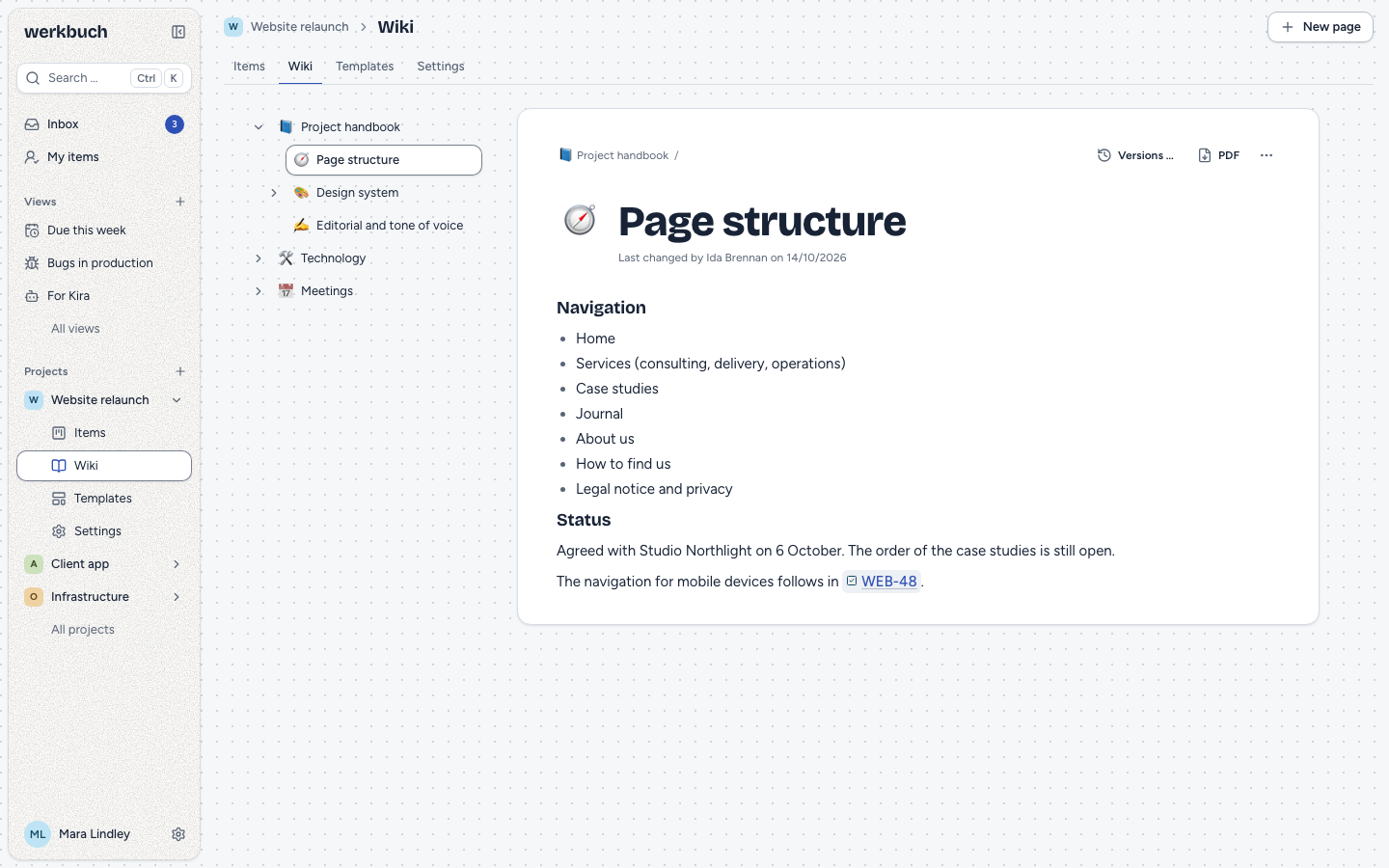
The tree
The tree lists every page of the project: on wide screens to the left of the page, on smaller ones on the overview of the wiki. It starts folded: only the top level shows, and the pages above the open page unfold with it. What you unfold or fold stays as it is when you open another page, go back and forth, switch to the items and back or reload; werkbuch keeps it in your browser, per person and project.
- Create: New page in the head of the wiki (also in the command palette) creates a page at the end of the top level and opens it with the title "New page" selected, ready to be typed over. Add a subpage in More actions of a page creates one below it.
- Keys: the tree is one stop for Tab. ↑ and ↓ move between pages, → unfolds the subpages or goes to the first one, ← folds them away or goes to the parent page, Home and End jump to the first and last page, ↵ opens the page. All keys are on the keyboard page.
- Drag: with a mouse, a page moves by its handle at the start of the row. A line shows where it lands; dragging further to the right puts it below the page above, dragging to the left takes it up a level. The subpages move along. Esc cancels.
- Move to …: without a mouse (and on touch screens), More actions → Move to … (also in the palette) asks for the new parent page (Under, or Top level) and the Position among its pages (before a page, or At the end). A page can never go below itself or one of its subpages.
- Delete: More actions → Delete …, ⌘ / Ctrl+⌫ on the page or on a row of the tree. werkbuch always asks first and names the subpages that go with it. Then the page and its whole subtree are gone at once, and for five seconds Undo (or ⌘ / Ctrl+Z) brings them back. Afterwards they are deleted for good, with all their versions; images that another text of the project still shows stay with that text.
Moving a page is no change of its text: it keeps its version, and someone editing it at the same time gets no conflict.
Editing a page
The title is one line of at most 200 characters. The emoji in front of it is chosen in the emoji picker and can be removed again. The text uses the page level of the editor: headings, lists, checklists, tables, code, quotes, horizontal rules, mentions, references, images and files.
- Saving is automatic, 1.2 seconds after you stop typing, when you leave the title or the text, and at once with ⌘ / Ctrl+↵. In the head of the page, werkbuch says Saving …, Saved with how long ago, or Not saved. When saving fails, your text stays, and a message offers Try again.
- A title is required. While the title is empty nothing is saved; leaving the page with other changes saves them under the title the page had.
- Images and files are pasted, dragged into the text or chosen with Image or file in the
/menu. Saving waits until their uploads are done. - Unsaved text is kept for the visit: it comes back when you open the page again, and leaving the browser asks first while some is left.
- Losing access while typing: when the project is archived or your role changes while text is unsaved, the page turns read-only and shows your text above it with Copy and Discard. When someone deletes the page, it says "This page was deleted" and keeps your text the same way.
The tree and the open page follow the changes of others live. A save of someone else shows in your editor only while you have not typed anything; otherwise your next save meets the conflict below.
Editing at the same time
Every save names the version of the page it started from. When someone else has saved the page since, werkbuch saves nothing. Your text stays in the editor, and a banner says "Jonas Feld has changed the page in the meantime." with two choices:
- Reload puts the new version into the editor; your text is discarded. A message offers Undo for a few seconds, which brings your text and the banner back.
- Keep my version saves your text over the new one. The other version is kept as a version first, so nothing is lost.
When the other save came from you in another window, the banner says so. Leaving the page while the conflict is open saves nothing; a message says so with Open, and the banner is there again when you come back. Restoring a version waits until the conflict is settled.
Versions
werkbuch keeps the state of a page as a version:
- before a save replaces the state another account saved,
- when someone saves after the page rested for at least ten minutes (the state that rested is kept, not every pause in between),
- before Keep my version overwrites the other version, also when it was your own,
- before a version is restored.
A version keeps the title, the text, who wrote it and when; the emoji is not part of it. Versions … in the head of the page (also in the palette) lists them newest first, the current one marked; choosing one shows its title and text. Restore this version makes it the current state with a new version number: the state before is kept as a version, the emoji stays, mentions and references of the version stay, and an image that no longer exists drops out. Viewers read the versions but cannot restore them. Versions go only with their page.
References and search
#in any text of a project offers wiki pages below the items. A reference stores only the ULID of the page; whoever reads it sees the current emoji and title and follows it to the page. A page the reader cannot see shows as hidden, without a title. In Markdown a reference is[Title](page:<ulid>), in mails a link to the page.- Mentions in a page work as in other texts, but notify nobody: pages have no watchers, and the inbox and its mails belong to work items.
- Search: the command palette finds pages by title and text under Pages, below the items (see search).
- In the item: the item shows the pages that refer to it in its own section Wiki pages, between the relations and the files, each as a link to the page with the wiki it belongs to. The section is there only if at least one page refers to the item and you can see it; it follows changes in the wiki. Only the current text of a page counts, not its versions, and a key written as plain text is no reference.
- Links:
/projects/WEB/wiki/<ulid>opens a page. A page of another project leads to the wiki of that project, a former identifier to the current one; a page that does not exist (or that you cannot see) shows "This page does not exist", with the tree.
PDF
PDF in the head row of a page downloads it as a PDF, also for viewers. A page with subpages offers This page and With subpages: the page and everything below it in the order of the tree, with a table of contents in front. The command palette has the same as Download as PDF.
- The PDF shows what you see: names as they are now, a reference to an item or page you cannot see as hidden, images in their preview size. An image of another project, and one over 4 MB, stands as a line with its name.
- One PDF takes at most 100 pages; above that the download is refused with the number of pages.
- Ten PDFs a minute per account. A PDF needs the service Gotenberg of the stack (see operations); without it PDF is disabled and says why, and the REST answer is
503 pdf_unavailable. - REST:
GET /api/v1/pages/<ulid>/pdf(with?subpages=1the subtree) answers{data: {url, filename, pages}}; the file is aturl(GET /pages/<ulid>/pdf), for the session and for tokens withread:
url=$(curl -s https://werkbuch.example.com/api/v1/pages/$PAGE/pdf?subpages=1 -H "Authorization: Bearer $TOKEN" | jq -r .data.url)
curl -s "$url" -H "Authorization: Bearer $TOKEN" -o handbook.pdf
Permissions
The wiki follows the roles of the project:
- Members and admins of the project create, edit, move and delete pages and restore versions; org admins do so in every project, bots only as members.
- Viewers and people outside a public project read the tree, the pages and their versions. They see no editor, and New page is disabled and says why.
- Archived projects keep their wiki readable and searchable (the search finds its pages only with
include_archived); creating, saving, moving, deleting and restoring is refused with409 project_archived. - Images and files of a page are delivered to everyone who sees the project.
REST
Reading needs a token with read, changing one with write. Projects are addressed by ULID, identifier or former identifier, pages and versions by ULID. A page or project the account of the token does not see is a 404, like one that does not exist; a viewer who tries to change something gets 403 with the reason forbidden and "Only members and admins of the project edit the wiki."
| Request | Answer |
|---|---|
GET /api/v1/projects/{project}/pages | The whole tree without text, nested in children, with meta.total. |
POST /api/v1/projects/{project}/pages | 201 with the new page: title (required), emoji, content (Markdown) or content_json, parent_id. |
GET /api/v1/pages/{page} | The page with content (Markdown) and content_json (Tiptap JSON). |
PATCH /api/v1/pages/{page} | 200 with the page; title, emoji, content or content_json, base_version, keep_current. |
POST /api/v1/pages/{page}/move | 200 with the page; parent_id and before_id. |
DELETE /api/v1/pages/{page} | 200 with {"deleted": n}, the number of pages deleted with the subtree. |
GET /api/v1/pages/{page}/versions | The versions without text, newest first, with cursor and per_page. |
GET /api/v1/pages/{page}/versions/{version} | One version with content and content_json. |
POST /api/v1/pages/{page}/versions/{version}/restore | 200 with the page in its new state. |
GET /api/v1/work-items/{item}/pages | The pages whose current text refers to the item, without text, by title; only pages you see count, also in meta.total. |
Read the tree
curl -H "Authorization: Bearer <token>" \
https://werkbuch.example.com/api/v1/projects/WEB/pages{
"data": [
{
"id": "01m6c0a1b2c3d4e5f6g7h8j9ka",
"project_id": "01m6akx72yptw2aw6n30m5fg0a",
"parent_id": null,
"rank": "a0",
"title": "Projekt-Handbuch",
"emoji": "📘",
"version": 4,
"created_by": "01m6akx65qgwfz2m2tz3bpt7st",
"created_at": "2026-10-12T08:30:00.000000Z",
"updated_by": "01m6akx65qgwfz2m2tz3bpt7st",
"updated_at": "2026-10-27T14:05:00.000000Z",
"children": [
{ "id": "01m6c0a1b2c3d4e5f6g7h8j9kb", "title": "Seitenstruktur", "version": 3, "children": [], "…": "…" }
]
}
],
"meta": { "total": 12 }
}The tree has no pages: it always comes whole. Pages of one level are in their order; rank is that order as a key (compare it byte by byte).
Save a page
PATCH changes only what you send. Send the version you read as base_version, so that a newer state of someone else is not overwritten:
curl -X PATCH https://werkbuch.example.com/api/v1/pages/01m6c0a1b2c3d4e5f6g7h8j9kb \
  -H "Authorization: Bearer <token>" \
  -H "Content-Type: application/json" \
  -d '{"content": "## Navigation\n\nFive entries at most. See WEB-48.", "base_version": 3}'
The answer is the page with its new version. A save that changes nothing answers with the page as it is and keeps its version. If the page has changed since version 3, the answer is 409 with the page as it is now in current, and nothing is saved:
{
  "type": "urn:werkbuch:problem:page_conflict",
  "title": "Conflict",
  "status": 409,
  "detail": "Jonas Feld has changed the page in the meantime.",
  "reason": "page_conflict",
  "current": { "id": "01m6c0a1b2c3d4e5f6g7h8j9kb", "title": "Seitenstruktur", "version": 4, "content": "…", "…": "…" }
}
To keep your text anyway, send it again with "base_version": 4 and "keep_current": true: the state of current is kept as a version before yours replaces it. Without base_version the last save wins; the state of another account is kept as a version first all the same.
Move a page
Both fields are required. parent_id is the new parent page, null the top level; before_id is the page it goes in front of, null the end:
curl -X POST https://werkbuch.example.com/api/v1/pages/01m6c0a1b2c3d4e5f6g7h8j9kb/move \
  -H "Authorization: Bearer <token>" \
  -H "Content-Type: application/json" \
  -d '{"parent_id": null, "before_id": null}'
The subpages move along. Moving changes neither version nor updated_at.
Delete a page
curl -X DELETE https://werkbuch.example.com/api/v1/pages/01m6c0a1b2c3d4e5f6g7h8j9ka \
-H "Authorization: Bearer <token>"{ "deleted": 3 }The page goes with its whole subtree and all versions. There is no undo over the API.
Versions
curl -H "Authorization: Bearer <token>" \
https://werkbuch.example.com/api/v1/pages/01m6c0a1b2c3d4e5f6g7h8j9kb/versions{
"data": [
{
"id": "01m6c1v2w3x4y5z6a7b8c9d0ef",
"page_id": "01m6c0a1b2c3d4e5f6g7h8j9kb",
"version": 2,
"title": "Seitenstruktur",
"author_id": "01m6akx65qgwfz2m2tz3bpt7st",
"created_at": "2026-10-20T10:30:00.000000Z"
}
],
"links": { "…": "…" },
"meta": { "per_page": 100, "next_cursor": null, "total": 2, "…": "…" }
}GET …/versions/{version} adds content and content_json; POST …/versions/{version}/restore makes it the current state and answers with the page.
Errors
A request that does not fit is a 422 with every problem at once:
| Field | Meaning |
|---|---|
title | Empty, or longer than 200 characters. |
emoji | Not a single emoji. |
content, content_json | Not readable as rich text, too long, or an image or file the page may not use (see rich text). Send one of the two, never both. |
parent_id | Not a page of this project, or the page itself or one of its subpages. |
before_id | Not a page on the level the page goes to. |
base_version, keep_current | Not a whole number from 1, or not a boolean. |
Saving, moving, deleting and restoring in an archived project is a 409 with the reason project_archived. Messages come in the language of the account.