

Notifications
werkbuch tells people about the work that concerns them: in the inbox of the app and, if they like, by mail. Lists, item pages and the inbox also follow changes by others live, without a reload. Over the API, the inbox and the settings are GET /api/v1/notifications and GET /api/v1/notification-preferences.
Who is notified
| Event | Who hears about it | Mail by default |
|---|---|---|
| Assigned | The person the item is now assigned to, also when the item is created assigned | on |
| Mentioned | Whoever is newly mentioned in a description, a rich text property or a comment, also when a comment is edited | on |
| New comment | The watchers of the item | on |
| State change | The watchers of the item | off |
| Other changes | The watchers of the item: title, description, priority, dates, labels, properties, type, parent item, relations, files, and an assignment to someone else | off |
| Due or overdue | The person an item is assigned to, every morning (see Reminders) | on |
| New item in the project | Only the lead of the project | off |
| Template failed | The lead of the project and the author of the template, when a run on the schedule or with Run now fails (see templates) | off |
| Webhook switched off | Every active org admin, when the system switches off a webhook that failed for 24 hours | off |
Who watches an item is explained under Work items. On top of that:
- The lead of a project counts as a watcher of every item of the project, unless they stopped watching that item.
- Whoever stopped watching an item hears about it only when they are mentioned in it or it is assigned to them.
- Never the person who made the change, not even through mentioning or assigning themselves, nor the person whose move set off an automation or who pressed Run now on a template. Never bots, deactivated accounts or accounts that no longer see the project.
- One entry per person and change. When several events meet (you are mentioned in a comment on an item you watch), you get the strongest one: mentioned, then assigned, then comment, state change, other changes, due, new item. When both channels of the strongest one are off for you, the next one counts.
- No notification for archiving, restoring or deleting an item, for watching, reactions, a deleted comment or a change of the manual order. When a workflow change gives items another state, nobody is notified either; the history of the item shows the move. The same goes for the nightly automations (auto-archive, auto-close and its comment, also a parent auto-close closes through "close parent"). Wiki pages notify nobody, also not a person mentioned in them.
Access is checked three times: when the notification is written, when you read it and when a mail goes out. Whoever loses access to a project sees none of its notifications from then on, also not the old ones; they come back with the access. A notification goes with its item and its project when they are deleted.
Channels and defaults
Every person chooses per event where they hear about it, in their personal settings under Notifications (/me/notifications): In-app (the inbox) and Email. The inbox is on for every event; mail is on for assigned, mentioned, new comment and due or overdue. Defaults puts everything back. When the instance has no mail server, the column Email is locked and the stored choice stays for later.
Bots have no inbox and no settings; they never get notifications.
Inbox
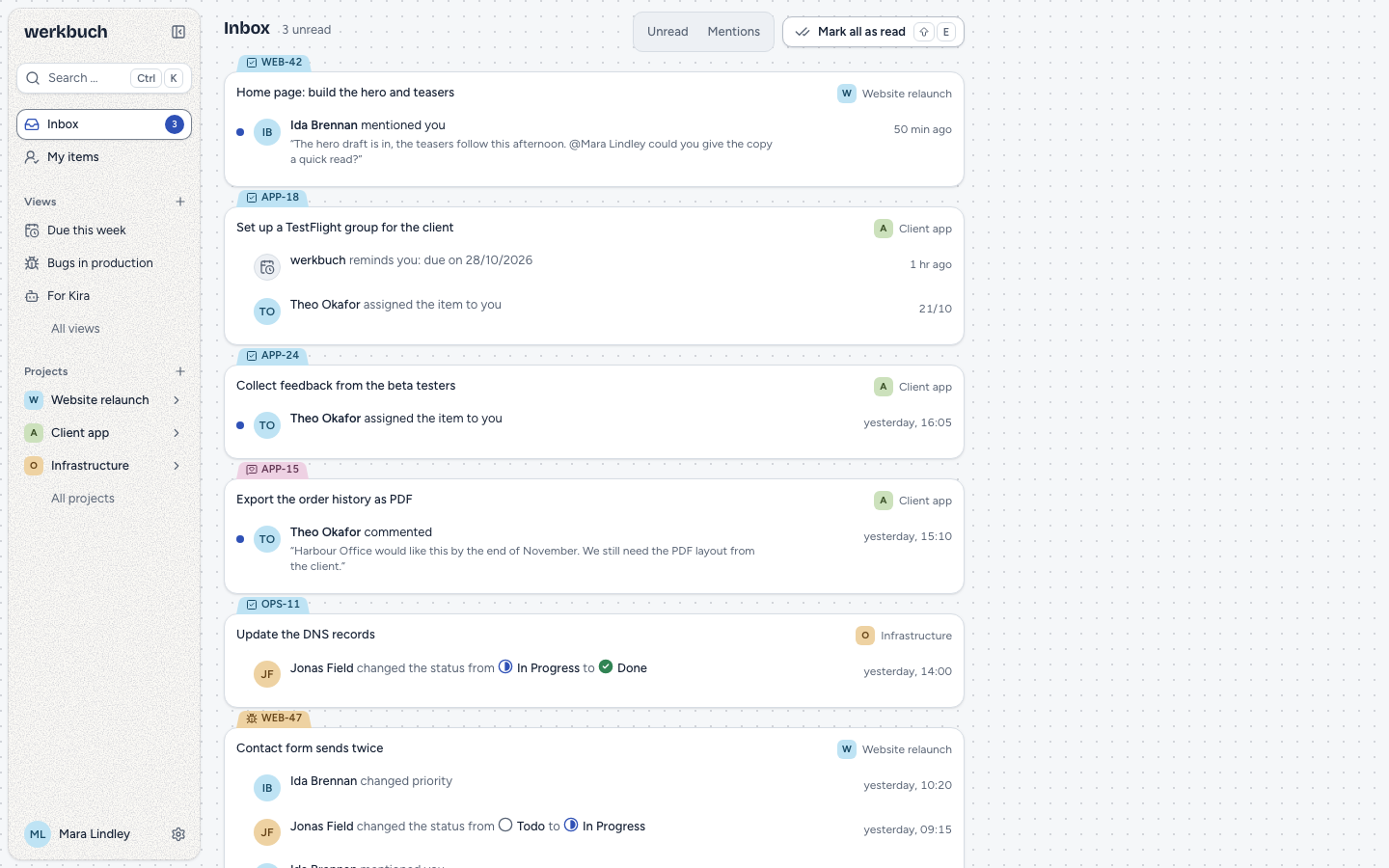
The inbox (/inbox, G I) groups the notifications by item, the newest first, and shows the newest 50; older ones move up once you delete newer ones. Each row says who did what, with a short excerpt of the comment or the description where you were mentioned, and when. The badge next to Inbox in the sidebar, the folded sidebar and the bar on a phone counts the unread notifications and follows them live.
- Filters: Unread and Mentions, also together; they stay in the address.
- Opening reads. A click on a row or ↵ opens the item in the preview and marks the notification as read; a click with ⌘ / Ctrl or the middle button opens it in a new tab and reads it too. A notification without an item opens its page. Mark as unread (U) takes it back.
- Mark all as read (⇧E) reads what the filter Mentions leaves: with the filter on, only the mentions.
- Delete (#) removes a notification; for 5 seconds Undo (⌘ / Ctrl+Z) brings it back.
- Keys: J and K (or ↓ and ↑) move between rows, E marks as read, U as unread, Space opens the preview. All keys are on the keyboard page. On a touchscreen, every row has a menu with the same actions.
An excerpt always comes from the current text: an edited comment shows its new wording, a deleted one none. A reference to an item you do not see reads as hidden. When the item of a notification is no longer there, its card says "No longer available".
Mail
- Collected. Notifications about one item are collected for
NOTIFICATION_MAIL_DELAYminutes (5 by default) and then go out as one mail per person and item, the oldest first. Its subject is[WEB-47] Title of the item, the footer links to the notification settings. Failed runs of a template are collected per template instead: the subject names the project and the template, the button leads to the template. A webhook switched off has a mail of its own (subjectWebhook “…” switched off), whose button leads to its deliveries; in the inbox, the row leads there too. - In your language, the language of your profile, else that of the organization; times are in your time zone.
- Comments and mentions come with their current text. Links stay links, pictures and files appear as links to werkbuch; a mail never has attachments or embedded pictures. A long text is cut with Read more.
- Checked when sending. Right before the mail goes out, werkbuch checks every line again: the account is active, it still sees the project, the item exists, the notification is still unread and mail is still on for that event. What you read in the inbox in the meantime is not mailed. When nothing is left, no mail goes out.
- Without a mail server (
MAIL_MAILERlogorarray), there are no notification mails, only the inbox, and none follow later once a mail server is set up. - When the mail server fails, werkbuch tries again (after 1, 5, 15 and 30 minutes, and the scheduler hands a mail to the queue again only when nothing tried it for 35 minutes: its job was lost). A mail that still fails 24 hours after it was due is given up and reported in the log. A crash right between the mail server and the database can send a mail twice; a mail is never lost that way.
php artisan app:send-notification-mails --now sends every open collection right away, for example before maintenance. A mail that fails is logged and the others go out all the same; the command then ends with an error. Without the option it hands at most 500 lost mails to the queue per minute.
Reminders
Every morning at 08:00 in your time zone (the one of your profile, else that of the organization), werkbuch reminds you of every item assigned to you whose due date is today (due) or earlier (overdue), counted in your own calendar. It does so every day as long as the item is open. Closed and archived items and items of archived projects are left out. Each item is a notification in the inbox; the mail sums up all reminders of the day in one mail ("Your due and overdue items").
The scheduler runs the reminders every hour, for everyone for whom it is just 08:00, also in time zones with half hours and on the days the clocks change.
Cleanup
Read notifications are deleted after 90 days; unread ones stay. Collected mails are deleted 90 days after they went out; notifications you only get by mail go two days after their mail. A reminder hour more than a day ago reminds nobody. The scheduler cleans up every hour.
Live updates
Lists, boards, tables and timelines, the item page and the preview (fields, comments, reactions, history), the projects you see and their members, the wiki (tree and pages), the templates of a project with their logs, the automations, and the inbox with its badge follow changes by others live. A message only says what changed (ids and the kind of change, never a title, a text or a value); the browser then loads the new state through the API, which checks your access. A project that is new or turns public reaches everyone who may see it now, members or not (a private one its members and the org admins). Changes to catalogs, views, accounts and favorites show the next time a page loads. When your org role changes, the page takes your new rights at once. An item page or a preview of an item that was deleted says so.
- Your own changes are not applied twice: the tab that made a change does not get it back, your other tabs do.
- Losing access cuts the connection. When you are removed from a project, a project turns private, your org role goes from admin to member or your account is deactivated, werkbuch closes your live connections. The browser connects again and asks for every channel anew; a project you no longer see is refused, and its lists and pages reload and show what you may still see.
- No connection. When the browser has had no connection for 3 seconds, a banner says "Live updates paused" with Reload. When the connection comes back, the pages load what they missed.
Live updates run over Reverb with WebSockets. The browser connects to REVERB_HOST, REVERB_PORT and REVERB_SCHEME, which it gets from the page at runtime; Reverb itself listens on REVERB_SERVER_HOST and REVERB_SERVER_PORT. A reverse proxy in front of werkbuch has to pass WebSockets through (in Nginx Proxy Manager the switch "Websockets Support"); otherwise the banner stays. A queue worker has to listen on the queue live. When a message does not reach Reverb, werkbuch sends none for 30 seconds and does not try again (the log gets the error at most every 10 minutes); the browsers load what they missed when they connect again. Without Reverb (BROADCAST_CONNECTION other than reverb), the browser does not connect and shows no banner; pages then update when they load next. Live updates belong to the session of the interface; REST and MCP clients hear about changes through webhooks.
REST
The inbox and the settings belong to the account of the token: reading needs read, everything else write.
| Endpoint | Meaning |
|---|---|
GET /api/v1/notifications | The inbox, newest first, in pages (cursor, per_page 1–100). filter[unread]=1 keeps the unread, filter[event]=mentioned the mentions (several events separated by commas). |
POST /api/v1/notifications/read | {"ids": [...]} (1 to 100) or {"all": true}, with "mentions_only": true only the mentions. Answers {"updated": n}. |
POST /api/v1/notifications/unread | {"ids": [...]}; answers {"updated": n}. |
DELETE /api/v1/notifications/{id} | Deletes one notification; 204. |
GET /api/v1/notification-preferences | The settings: per event first inbox, then mail. |
PUT /api/v1/notification-preferences | {"preferences": [{"event", "channel", "enabled"}, ...]}; rows you leave out stay. Answers the whole list. |
curl -H "Authorization: Bearer <token>" \
"https://werkbuch.example.com/api/v1/notifications?filter[unread]=1&per_page=20"{
"data": [
{
"id": "01m6b2q7k9x3c5v8n1r4t6y0wz",
"user_id": "01m6akw3f8p2d7s9q4h6j1k5mn",
"event": "mentioned",
"event_id": "01m6b2q7h2m8d4f6g9k1p3s5tv",
"project_id": "01m6akx0c4e7h2j5m8n1q3s6vw",
"work_item_id": "01m6akyecnp503vn6jmb8sp249",
"actor_id": "01m6akw3g1r5t8v2x4z7b9d3fh",
"data": { "source": "comment", "comment_id": "01m6b2q7g5k8n2q4s7v9x1z3bd" },
"excerpt": "@Mara Lindqvist can you check the second submit on mobile?",
"read_at": null,
"mailed_at": null,
"created_at": "2026-11-04T08:12:31.204517Z",
"item": { "id": "01m6akyecnp503vn6jmb8sp249", "key": "WEB-47", "title": "Kontaktformular sendet doppelt", "…": "…" }
}
],
"links": { "…": "…" },
"meta": { "per_page": 20, "next_cursor": null, "total": 1, "…": "…" }
}event is one of assigned, mentioned, comment, state_changed, item_changed, due, item_created, template_run_failed, webhook_disabled. data holds only ids and names of fields: {source, comment_id} for a mention, {comment_id} for a comment, {from, to} (the states as they were called) for a state change, {fields} for other changes, {due_date, overdue} for a reminder, {template_id, error} for a failed template (its item is null), {webhook_id, name} for a webhook switched off (without project and item). mailed_at is when the mail with this notification went out, item the item in the short form of lists.
Mark a notification as read, or all mentions at once:
curl -X POST -H "Authorization: Bearer <token>" -H "Content-Type: application/json" \
  -d '{"ids": ["01m6b2q7k9x3c5v8n1r4t6y0wz"]}' \
  https://werkbuch.example.com/api/v1/notifications/read

curl -X POST -H "Authorization: Bearer <token>" -H "Content-Type: application/json" \
  -d '{"all": true, "mentions_only": true}' \
  https://werkbuch.example.com/api/v1/notifications/read
Turn the mails about new comments off:
curl -X PUT -H "Authorization: Bearer <token>" -H "Content-Type: application/json" \
  -d '{"preferences": [{"event": "comment", "channel": "mail", "enabled": false}]}' \
  https://werkbuch.example.com/api/v1/notification-preferences
Ids of other accounts, of notifications you no longer see and unknown ids are passed over (updated counts only what changed); deleting one of them is a 404. Sending ids and all together, mentions_only next to ids, or a row with an unknown event or channel, is a 422 with every problem at once. Bots read an empty inbox and empty settings; changing settings is a 403 for them. Reading, marking and deleting write no history.
System page
Org admins find the state of the instance in the settings of the organization under System (/settings/system):
- Version of werkbuch.
- Queues: the backlog per queue and since when its oldest job waits (a job whose worker stopped counts as waiting; a queue werkbuch does not know shows at the end). Jobs meant for later, such as collected mails, count apart as scheduled and are no backlog.
- Failed jobs: the newest 50 with queue, job, error and time; Retry all puts them back into their queue, 500 at a time.
- Search: whether Meilisearch answers, with its open tasks and the tasks that failed in the last 24 hours.
- Email: whether a mail server is set up, and a test mail to your own address that goes out at once and shows the error of the mail server when it fails.
- Live updates: running, not reachable or off.
Over the API: GET /api/v1/system, POST /api/v1/system/failed-jobs/retry (optionally {"ids": [...]}, answers {"retried": n}) and POST /api/v1/system/test-mail (answers {"sent_to": "…"}; 409 with reason: mail_not_configured without a mail server, 503 with reason: mail_failed when the server refuses; six test mails a minute per account, more answer 429). werkbuch waits 20 seconds for a mail server that does not answer (MAIL_TIMEOUT). Members and bots get a 403.