

Work items
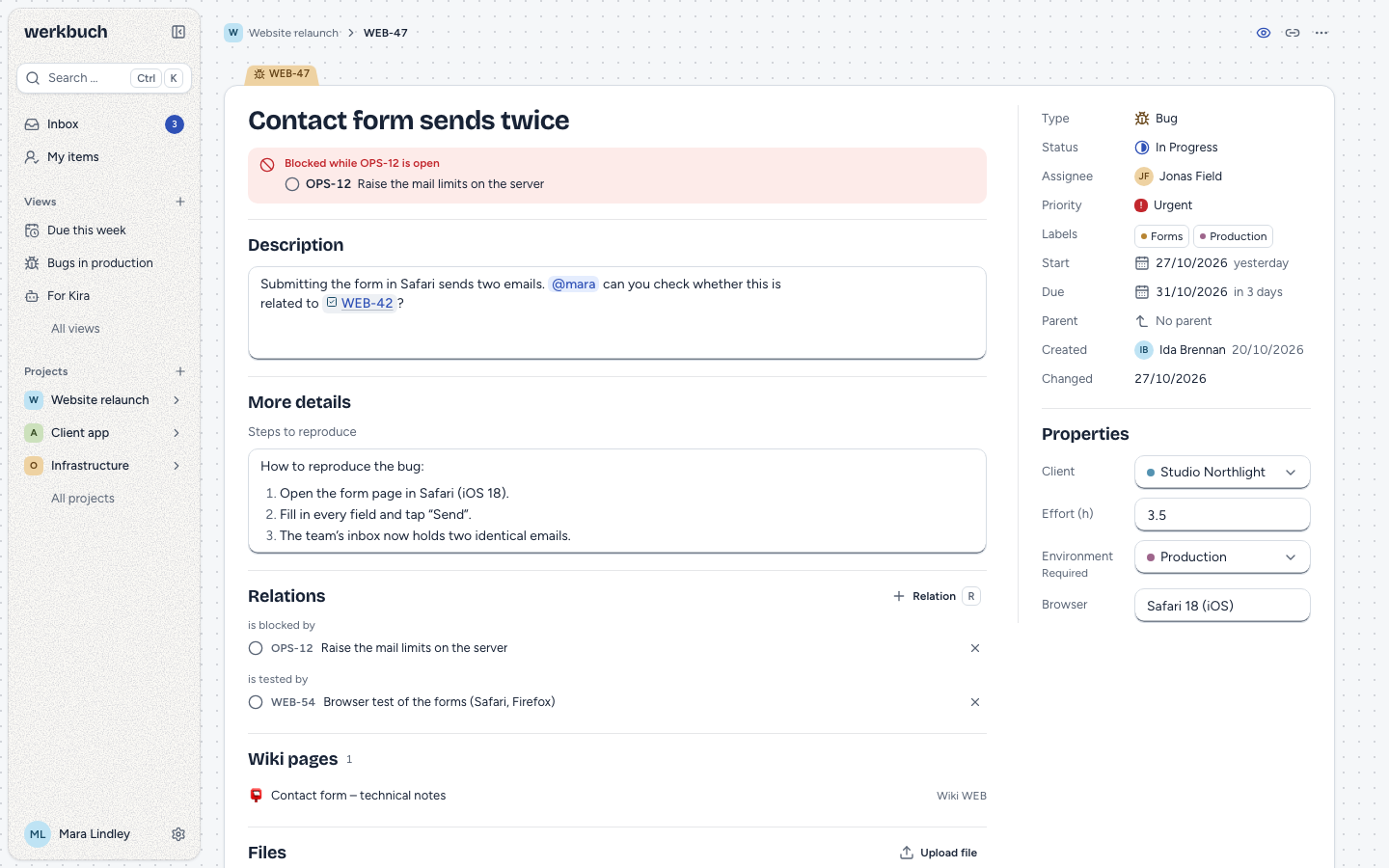
A work item is one piece of work in a project: a task, a bug, an epic, or whatever type your organization adds. Every item lives in exactly one project, moves through the workflow of that project, and keeps a history of everything that happened to it.
Anyone who sees a project reads its items. Members and admins of the project create and change them; viewers only read. Only project admins delete items. Who sees a project, and who has which role, is described under roles and permissions.
Fields
| Field | Notes |
|---|---|
| Key | WEB-47: the identifier of the project and a number. See below. |
| Type | One of the types switched on in the project; the default type unless you choose another. |
| Title | Required, up to 255 characters. |
| Description | Rich text: headings, lists, checklists, tables, code, links, mentions, references to items, images and files. |
| Status | A state of the workflow of the project. New items start in its start status. |
| Resolution | Set when the item closes, emptied when it opens again. |
| Assignee | Nobody or one person or bot: an active member of the project, or a person who is an org admin. The default bot only when it is a member. |
| Priority | Urgent, High, Medium, Low or None (the default). |
| Labels | Any number of labels of the organization. |
| Start date, due date | Days without a time. The start date is not after the due date. |
| Parent item | An epic of the same project. See below. |
| Properties | The fields of the type, such as "Customer" or "Effort (h)", some of them required. |
werkbuch also keeps who created the item and when, when it was last changed, when it was first started (the first time it entered a Started state), when it was closed (entering Completed or Canceled; emptied when it opens again) and when it was archived. An item made from a template remembers it in template_id; when the template is deleted, the item stays and template_id becomes null. An open item whose due date has passed shows as overdue, counted in the time zone of the organization.
Key
The key is the identifier of the project, a dash and a number: WEB-47. Numbers count up per project and are never given out again, not even after an item is deleted, so a key always means the same item.
When a project changes its identifier, the keys change with it, and the old ones keep working: /items/OLD-12 leads to /items/NEW-12, and the API answers a read by the old key with 301. Only an item you may see is redirected; for any other, the old key is as unknown as a key that never existed.
Type
The type decides which properties an item has. Changing it, in the interface with t or the type field, keeps the values the new type also has and drops the others. Before it does, the interface names the values that would go, and asks for the required properties of the new type that are still empty. The dropped values stay in the history.
The two levels of epics apply to the type too: an item with child items keeps an epic type, and an item with a parent item cannot become an epic. werkbuch refuses such a change and says why.
Status and resolution
The status changes along the transitions of the workflow: in a free workflow anything goes, with a matrix only the allowed pairs. A transition the workflow does not allow is refused everywhere, in the interface and over the API (409, reason: transition_not_allowed); the status field only offers the allowed ones.
Moving an item into a Completed or Canceled state closes it and sets its resolution: the one you choose, or else the default of the category. The interface asks, with the default chosen; mod+enter confirms. Moving it back into an open state empties the resolution. An item can also be created directly in another state; that is checked as a transition from the start status, and the history shows both steps.
Parent and children
Items of an epic type can have child items; epics have no parent item themselves, so there are two levels. The parent is an epic of the same project. An epic shows the progress of its children: the closed ones (Completed or Canceled) out of all. Child item in the children section of an epic creates one with the epic as its parent. An epic with more than 100 children shows the first 100 and Load more child items brings the next ones.
Relations
A relation links two items with a relation type, such as "blocks", "Duplicate" or "related". It reads from both ends: if WEB-30 blocks WEB-47, WEB-47 is blocked by WEB-30. Relations work across projects. An item cannot be related to itself, and the same pair cannot have the same type twice; with a symmetric type, the reverse pair counts as the same.
An item at the other end that you may not see appears as hidden item, without key or title. Removing a relation takes the right to change one of its ends.
Only "blocks" has a consequence: as long as an open item blocks another open one, the blocked item shows a hint. werkbuch does not stop anyone from starting it. The hint also counts a blocker you may not see, without naming it. All other relation types are labels only.
Wiki pages
If wiki pages refer to an item with a # reference, the item shows them in the section Wiki pages, between the relations and the files: each page as a link into its wiki. The section appears only when there is at least one such page you may see. It reads the current text of the pages, so it follows edits, moves and deletions in the wiki. See wiki.
Comments
Anyone who can read an item can comment on it, viewers included; bots too, over the API. A comment is rich text at the comment level: text, lists, quotes, code, links, mentions, references, images and files. In the interface, m opens the comment field at the end of the activity, and mod+enter sends. A comment that fails to send stays in the field, and text you have not sent stays for this visit even if you close the item.
You can edit and delete your own comments. An edited comment says edited, and the history keeps the earlier version; once the comment is deleted, the history only says that it was edited and deleted, without its text. Project admins and org admins can delete the comments of others, never edit them. Deleting waits five seconds with Undo.
Anyone who may comment can react with any emoji, once per emoji and person; pressing your reaction again takes it back. A skin tone is an emoji of its own.
An archived item, or an item in an archived project, takes no new comments and reactions, and its comments can be neither edited nor deleted. A comment does not change the item's "updated" time; sorting by it means its fields.
Files
The Files section of an item lists the files attached to it: images with a small preview, other files with an icon, each with name and size. An image opens in a new tab, with its download beside it; any other file downloads. Upload file or dragging files onto the section adds them, each with its own progress; Remove takes one away, with undo. Both take the right to change the item, and both are part of the history. Files stay inside the project: only someone who sees the item can download them.
Images and files inside a text (the description, a comment) are not part of this list; they belong to their text. How they are uploaded, which formats are shown inline, and how the size is limited is described under rich text.
Watching
Watchers hear about comments, state changes and other changes of the item in their inbox and, if they like, by mail; who hears about what is on Notifications. The person who creates an item, the person it is assigned to, whoever comments on it and whoever is mentioned in it watch it automatically. Anyone who can read an item can start or stop watching it, viewers included, also in an archived project. Whoever stops watching stays away until the item is assigned to them again or they are mentioned in it anew; commenting does not bring them back. Bots do not watch items.
Archive and delete
Archive is for closed items: it hides them from lists, and they become read-only until someone restores them. Only items in a Completed or Canceled state can be archived (409, reason: not_closed); a change to an archived item is refused (409, reason: archived). Restore makes it writable again in the status it had.
Delete removes an item for good, with its values, labels, relations, comments and files; only project admins may. The interface waits five seconds first, and Undo stops it. Child items become items without a parent, and both they and the items at the other end of its relations get an entry in their history. The history of the deleted item itself stays in the event log.
mod+backspace on an item archives it if it is closed and deletes it otherwise, both with undo. On a selection it acts only when that is the same for every item (all closed to archive, or none closed to delete).
Bulk changes
Several items can get the same change at once: status, resolution, assignee, priority, labels (set, add or remove), dates, archive and restore. Each item follows its own rules: its workflow, its project, your role in it. What is refused for one item does not stop the others; the answer lists the refused ones with their reason. In the interface, select items in a list (x, shift+x, mod+a): the bar above the list changes them all, the item shortcuts act on the selection, and one toast names whatever was refused. The interface offers an action for a selection only when it is allowed for every selected item, so it never changes just a part of them because of rights or archived items.
Changes at the same time
When two people change the same item, the last change wins field by field, and the history shows both.
The description is guarded: the interface sends the version of the description it started from. If someone else saved the description in the meantime, nothing is overwritten. Your text stays in the editor, a banner names who changed it, and you choose between loading the new version and keeping yours; the other one stays in the history. Over the API, the guard applies when you send base_description_version; without it, the last change wins.
History
Every change is an entry in the history of the item, with who made it, when, and how (in the interface, over the API, by an automation or a template). An item a template created says "From template "…"" with the name the template had then; a step of an automation names its reason, such as "Automation: close parent". A change of a field shows the old and the new value; a move names both states as they were called then, even if a state was renamed or removed later. The interface groups the changes one person makes within five minutes and shows the comments in the same timeline; the filter switches between everything, comments and changes. Editing and deleting a comment, and adding and removing a file of the file list, are entries too. Watching, reactions and the manual order of items are not part of the history.
REST
Reading needs a token with read, changing one with write. Items are addressed by ULID or key (WEB-47, in any case, also with a former identifier).
| Request | Answer |
|---|---|
GET /api/v1/work-items | Items you see: view, a short form such as filter[project], filter[assignee]=me, filter[q] (a key or part of the title), sort, show_sub_items, include_archived, lean, cursor, per_page. Filters, groups and counts are described under views. |
POST /api/v1/work-items | 201 with the new item. |
GET /api/v1/work-items/{item} | The item; ?include=children,relations,type,workflow,attachments embeds those (children: the first 100 by rank, archived ones included; children_progress.total counts all, the list ?filter[parent]=WEB-30&include_archived=1 has the rest). |
PATCH /api/v1/work-items/{item} | 200 with the item. |
POST /api/v1/work-items/{item}/transition | 200; to_state_id, resolution_id. |
PUT /api/v1/work-items/{item}/type | 200; type_id, values. |
POST /api/v1/work-items/{item}/archive | 200; .../restore brings it back. |
DELETE /api/v1/work-items/{item} | 204. |
POST /api/v1/work-items/bulk | 200 with updated and rejected. |
GET, POST /api/v1/work-items/{item}/relations | The relations as you see them; 201 with the new one (type_id, target_id). |
DELETE /api/v1/relations/{id} | 204. |
GET /api/v1/work-items/{item}/subscribers | Who watches the item. |
PUT, DELETE /api/v1/work-items/{item}/subscription | Start or stop watching; 200 with the item. |
GET /api/v1/work-items/{item}/history | The history, oldest first. |
GET /api/v1/work-items/{item}/pages | The wiki pages that refer to the item and that you see, by title. |
POST /api/v1/projects/{project}/redistribute-ranks | 200 with {"redistributed": n}; see Order items by hand. |
GET, POST /api/v1/work-items/{item}/comments | The comments, oldest first; 201 with the new one. Comments, reactions and files are described under rich text. |
An item the account of the token does not see is a 404, like one that does not exist. An unknown filter or include is a 422, never silently ignored. Messages (detail, field errors) come in the language of the account, else in the organization's default language.
Create an item
project_id takes the identifier or the ULID of the project. The description comes as Markdown in description or as Tiptap JSON in description_json, not both; the answer has both forms. HTML in Markdown stays text, links keep only http, https and mailto, and a description is at most 256 KB. values holds the properties by their key; a dropdown takes the ULID of an option. template_id makes the item from a template of the project and copies its images (see templates).
curl -X POST https://werkbuch.example.com/api/v1/work-items \
  -H "Authorization: Bearer <token>" \
  -H "Content-Type: application/json" \
  -d '{
    "project_id": "APP",
    "type_id": "01m6akx7247gfm80md352w7wra",
    "title": "Two colour variants for the start page",
    "description": "The client wants **two** variants:\n\n- light\n- dark",
    "priority": "high",
    "values": { "customer": "01m6akx71ps45t3brd0rtp5496" }
  }'
The answer (201, shortened):
{
  "data": {
    "id": "01m6akyecnp503vn6jmb8sp249",
    "number": 25,
    "key": "APP-25",
    "title": "Two colour variants for the start page",
    "description": "The client wants **two** variants:\n\n- light\n- dark",
    "description_json": { "type": "doc", "content": ["…"] },
    "description_version": 1,
    "state_id": "01m6akx71bcm10xw328kxkw7ak",
    "resolution_id": null,
    "priority": "high",
    "values": { "customer": "01m6akx71ps45t3brd0rtp5496", "approved": false },
    "values_markdown": {},
    "children_progress": null,
    "blocked": false,
    "blocking": false,
    "subscribed": true
  }
}
A required property without a value is a 422 at values.<key>, and nothing is created, not even a number is used up:
{
  "type": "urn:werkbuch:problem:validation_failed",
  "title": "Validation failed",
  "status": 422,
  "detail": "The input is not valid.",
  "reason": "validation_failed",
  "errors": { "values.customer": ["\"Customer\" is required."] }
}
state_id creates the item in another state, checked as a transition from the start status. parent_id, assignee_id, label_ids, start_date and due_date work as in a change.
Change an item
PATCH changes only what you send; null empties a field. Send base_description_version with a new description to guard it:
curl -X PATCH https://werkbuch.example.com/api/v1/work-items/APP-25 \
  -H "Authorization: Bearer <token>" \
  -H "Content-Type: application/json" \
  -d '{"description": "Four variants.", "base_description_version": 1}'
If the description has changed since version 1, the answer is 409 with the item as it is now in current, and nothing is saved. Send your text again with the description_version of current to keep it.
{
  "type": "urn:werkbuch:problem:description_conflict",
  "title": "Conflict",
  "status": 409,
  "detail": "Mara Lindqvist has changed the description in the meantime.",
  "reason": "description_conflict",
  "current": { "key": "APP-25", "description": "Three variants.", "description_version": 2, "…": "…" }
}
Move an item
curl -X POST https://werkbuch.example.com/api/v1/work-items/APP-25/transition \
  -H "Authorization: Bearer <token>" \
  -H "Content-Type: application/json" \
  -d '{"to_state_id": "01m6akx71dkvjjrrvepyrpwdtd"}'
In the demo workflow "Agentur-Freigabe", Todo may not go straight to Done:
{
  "type": "urn:werkbuch:problem:transition_not_allowed",
  "title": "Conflict",
  "status": 409,
  "detail": "From “Todo” to “Done” is not allowed in the workflow “Agentur-Freigabe”.",
  "reason": "transition_not_allowed"
}
For a closed state, resolution_id chooses the resolution; without it, the item keeps the one it had in that category, or gets the default. A state outside the workflow of the project is a 422 at state_id.
Order items by hand
The sort "Manual" follows the rank of each item (rank): a short text, compared byte by byte, the ULID decides between equal ones. Moving an item by hand sends a rank between its neighbours (PATCH with rank, up to 128 characters). When there is no room left between two neighbours, the items of the project get new short ranks in their order:
curl -X POST https://werkbuch.example.com/api/v1/projects/WEB/redistribute-ranks \
-H "Authorization: Bearer <token>"{ "redistributed": 57 }redistributed counts the items whose rank changed. Every item of the project keeps its place, archived ones included; none gets a new updated_at, and the history of an item does not show it. A list of several projects sorted by hand may mix their items differently afterwards. Members and admins of the project may do it (item.edit, the ability write), in an archived project nobody (409 project_archived). Changes of items of the project wait until the new ranks are saved.
Change several items
ids takes 1 to 100 ULIDs or keys, patch the change: state_id, resolution_id, assignee_id, priority, label_ids, add_label_ids, remove_label_ids, start_date, due_date and archived (true archives, false restores). Titles, descriptions and properties are not part of it. Each item is changed on its own; updated lists the ULIDs of every item that was not refused, unchanged ones included, rejected the refused ones under the reference you sent.
curl -X POST https://werkbuch.example.com/api/v1/work-items/bulk \
  -H "Authorization: Bearer <token>" \
  -H "Content-Type: application/json" \
-d '{"ids": ["WEB-47", "APP-25", "WEB-999"], "patch": {"priority": "low", "archived": true}}'{
"updated": ["01m6akyecnp503vn6jmb8sp249"],
"rejected": [
{ "id": "WEB-47", "reason": "not_closed" },
{ "id": "WEB-999", "reason": "not_found" }
]
}WEB-47 is open and cannot be archived, so it keeps its priority too. The reasons are those of the single requests: not_found, forbidden, project_archived, archived, not_archived, not_closed, transition_not_allowed, validation_failed. A patch with other keys is a 422 for the whole request, and nothing changes.
Read the history
GET /api/v1/work-items/APP-25/history returns a page of entries, oldest first, one per event:
{
  "data": [
    {
      "id": "01m6akyfzw4c5y5a3ckk9r8f1m",
      "type": "work_item.state_changed",
      "actor_id": "01m6akx65qgwfz2m2tz3bpt7st",
      "subject": { "type": "work_item", "id": "01m6akyecnp503vn6jmb8sp249" },
      "project_id": "01m6akx72yptw2aw6n30m5fg0a",
      "changes": {
        "state_id": { "old": "01m6akx71chfjn0xxagbvwdypv", "new": "01m6akx71e3nx5kbgq8zgtbhsw" },
        "resolution_id": { "old": null, "new": "01m6akx5waaqzm6e1q337g4zwp" }
      },
      "states": {
        "old": { "id": "01m6akx71chfjn0xxagbvwdypv", "name": "In Progress", "category": "started" },
        "new": { "id": "01m6akx71e3nx5kbgq8zgtbhsw", "name": "Cancelled", "category": "canceled" }
      },
      "reason": null,
      "via": "api",
      "occurred_at": "2026-11-01T03:55:20.676612Z"
    },
    {
      "type": "work_item.updated",
      "changes": { "title": { "old": "Test", "new": "Two colour variants for the start page" }, "priority": { "old": "high", "new": "medium" } },
      "…": "…"
    }
  ],
  "links": { "first": null, "last": null, "prev": null, "next": null },
  "meta": { "path": "https://werkbuch.example.com/api/v1/work-items/APP-25/history", "per_page": 100, "next_cursor": null, "prev_cursor": null, "total": 9 }
}
The types are work_item.created, updated, state_changed, assigned, archived, restored, relation_added, relation_removed and deleted, and comment.updated (with the old and new text in changes.body) and comment.deleted (without text). A file of the file list shows up as attachments with {id, filename}. A property shows up as values.<key>, a description as Tiptap JSON. A relation names the other item with its current key when you see it, and only {"label": "…", "hidden": true} when you do not.
Former keys
After WEB is renamed to SITE, a read by the old key moves on:
curl -i https://werkbuch.example.com/api/v1/work-items/WEB-47 -H "Authorization: Bearer <token>"HTTP/2 301
location: https://werkbuch.example.com/api/v1/work-items/SITE-47
cache-control: no-store, privateThe query string comes along. Changes by the old key (PATCH, POST, DELETE) act on the item directly, without a redirect.