

Views
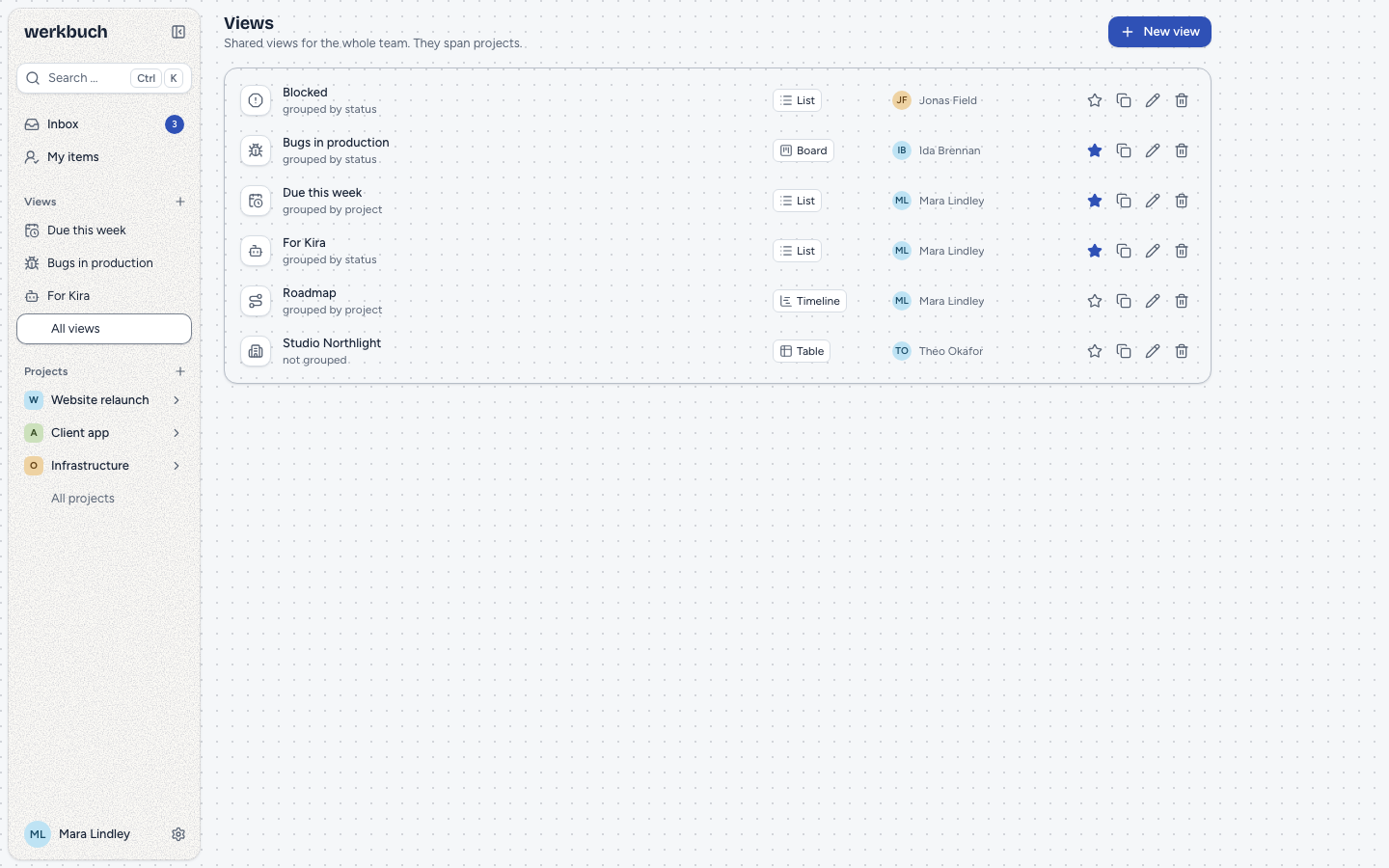
A view is a saved list of work items: a filter and a way to show what it finds. Views belong to the whole team and work across projects; the project is a filter like any other. Everybody sees in a view only the items of projects they may see, so the same view can show Mara more items than Ida.
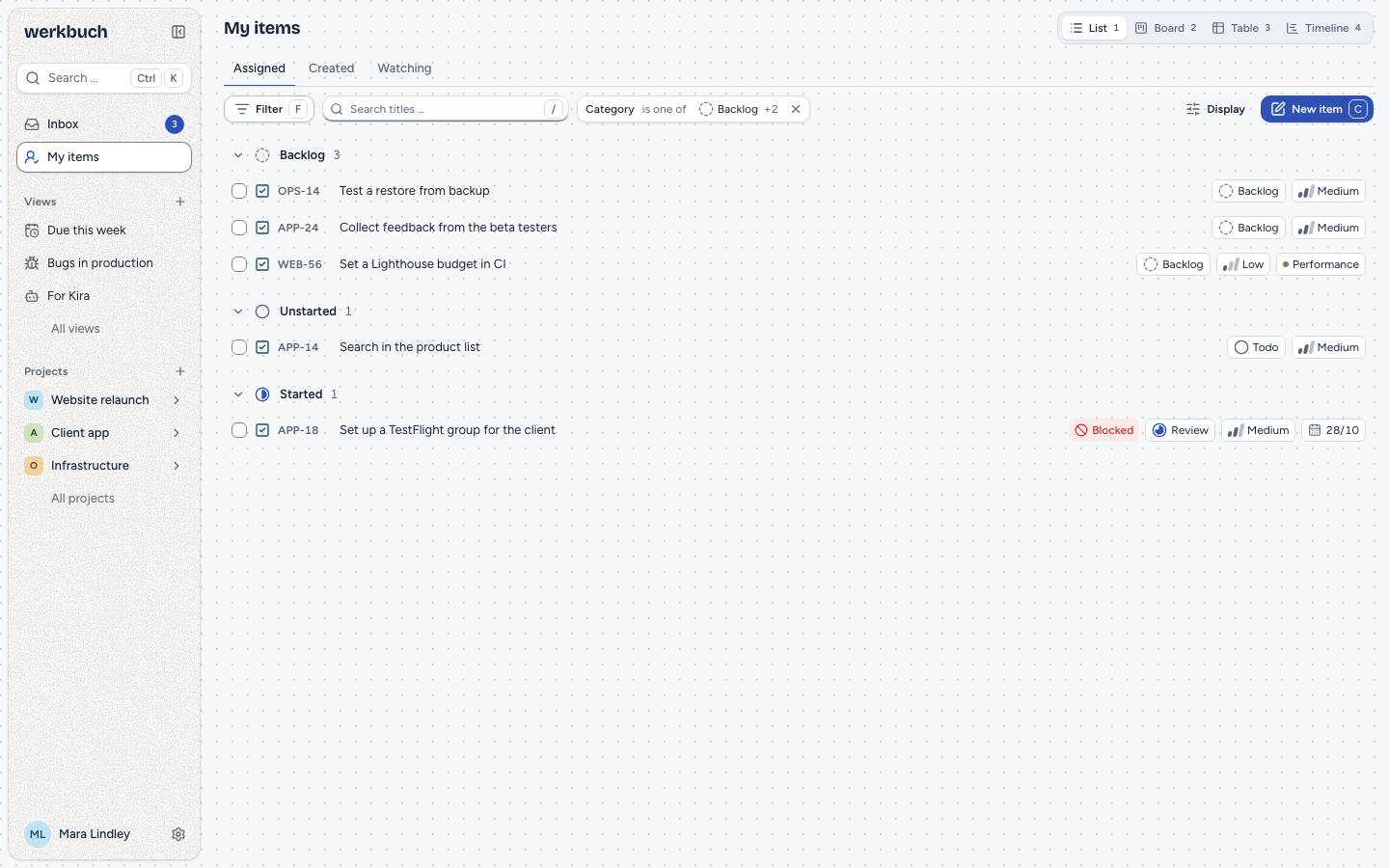
Every item list in werkbuch works the same way, saved or not: My items, the list of a project and every view have the filter bar, the Display menu and the four layouts. Filtering, sorting, grouping and paging happen on the server; the browser only shows what comes back.
Views and built-in lists
Four lists are built in and cannot be deleted:
| List | Address | Holds | Starts with |
|---|---|---|---|
| My items: Assigned | /my-items | Open items assigned to you | Grouped by category, sorted by priority |
| My items: Created | /created | Items you created | Grouped by category, newest first |
| My items: Watching | /subscribed | Items you watch | Grouped by category, last changed first |
| Project | /projects/WEB | The items of the project | Grouped by status, manual order |
A built-in list is a view that is never saved. You can filter and change its display; only a different filter counts as an unsaved change. Save as new view … (in the bar of unsaved changes, or at the end of Display) turns what you see into a view, and keeps what the list stands for as a condition: "Project is Website", "Assignee is me", "Creator is me" or "Watched is yes".
Saved views live under Views (/views) and at /views/<id>. A star puts a view into the sidebar, in your own order; deleting a view takes it out of everybody's sidebar.
Permissions
| Action | Who |
|---|---|
| Read a view | Every active account |
| Create a view, save as new view, duplicate | Org admins and org members |
| Change or delete a view | The person who created it, and org admins |
A view has a name (up to 60 characters), an icon (one of the list in the dialog, or exactly one emoji), a filter and a display. Save replaces the whole view; when two people save the same view at the same time, the second one wins as a whole. Whoever may not change a view can still save a copy with Save as new view … or Duplicate.
A filter may name a project, person or item the reader does not see. werkbuch keeps the condition as it is and shows it as "Hidden project", "Unknown person" and so on; it matches only what the reader sees.
Layouts
1 to 4 switch between the layouts; the switch is also in the header of every list. The layout is part of the display and of a saved view.
List
Items in groups that fold, the fields of the display as chips behind the title, child items indented below their epic. Each group shows the number of its items from the server and loads its items page by page while you scroll; groups that are folded or far away load nothing.
Board
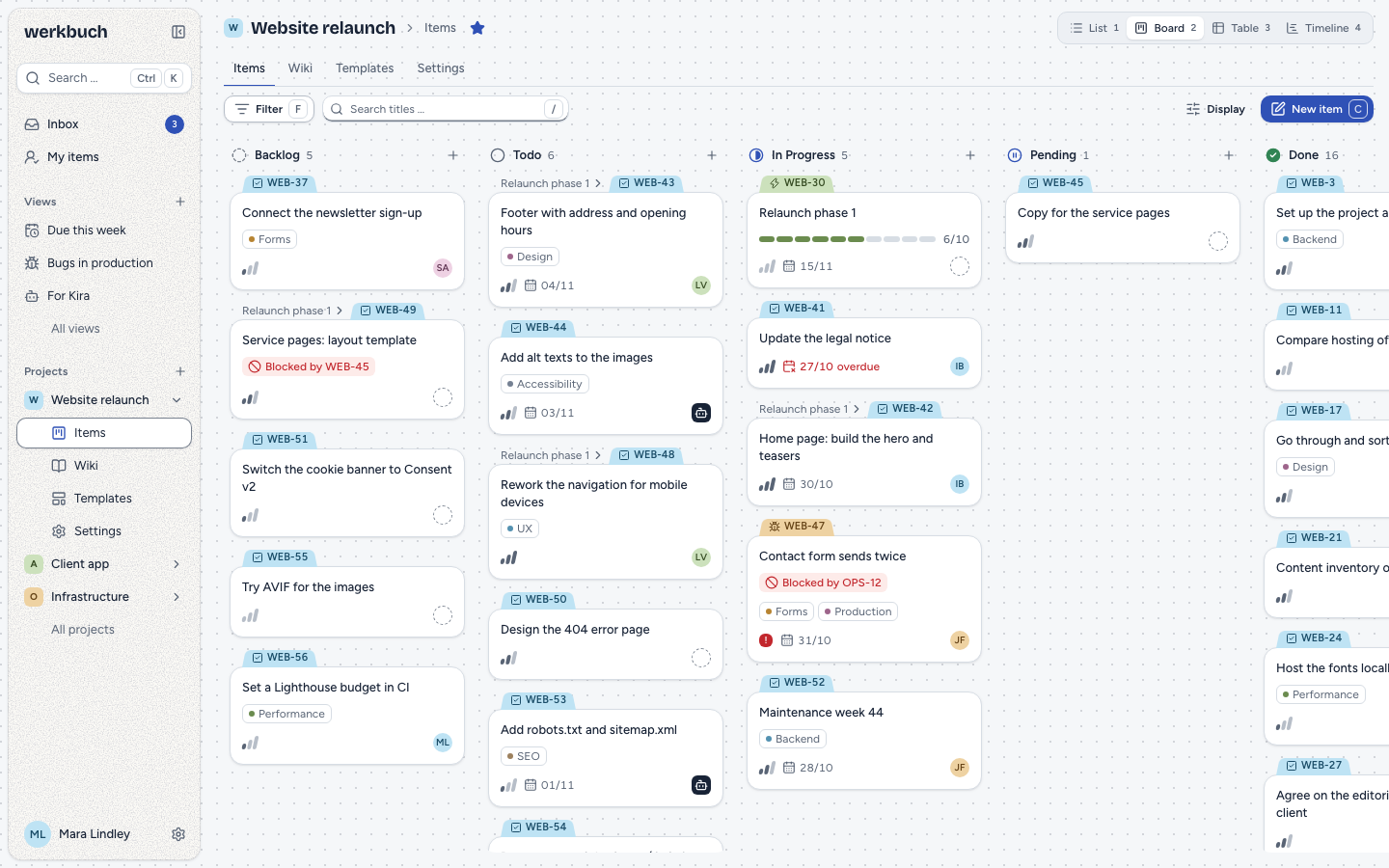
Every group is a column, empty ones included. Dragging a card, or shift+left and shift+right, changes the grouped field:
- Status: only along the transitions of the workflow. A move the workflow does not allow stays in its column and a toast says why; into a closed state, werkbuch asks for the resolution.
- Category: the item takes the first state of that category in its own workflow that it may move to; if there is none, the toast says so.
- Priority and assignee: the new value; a person who is not a member of the project cannot take the item.
- Type, project, parent item: cards stay in their column. Label: a board grouped by label cannot be dragged, because an item stands in the column of each of its labels.
The order within a column follows the sort of the display. With the sort Manual, alt+up and alt+down or dragging within the column move a card between its neighbours; with any other sort, werkbuch says that the order follows the sort. When there is no room left between two neighbours, werkbuch first redistributes the order of the card's project (the order stays, the ranks get short again, see Order items by hand) and then moves the card; moves of other cards of the project wait for it. The card stays where it was, and a toast says why: there is no room left when the two neighbours belong to another project; the order has changed when other cards now stand between the two neighbours (in a list of several projects after the redistribution, or after another change of the column), so move the card again from the new order; and the new order has not loaded when it takes longer than five seconds. A move the server refuses puts the card back, and the numbers of the columns are right again. + in the head of a column creates an item that fits the column.
Table
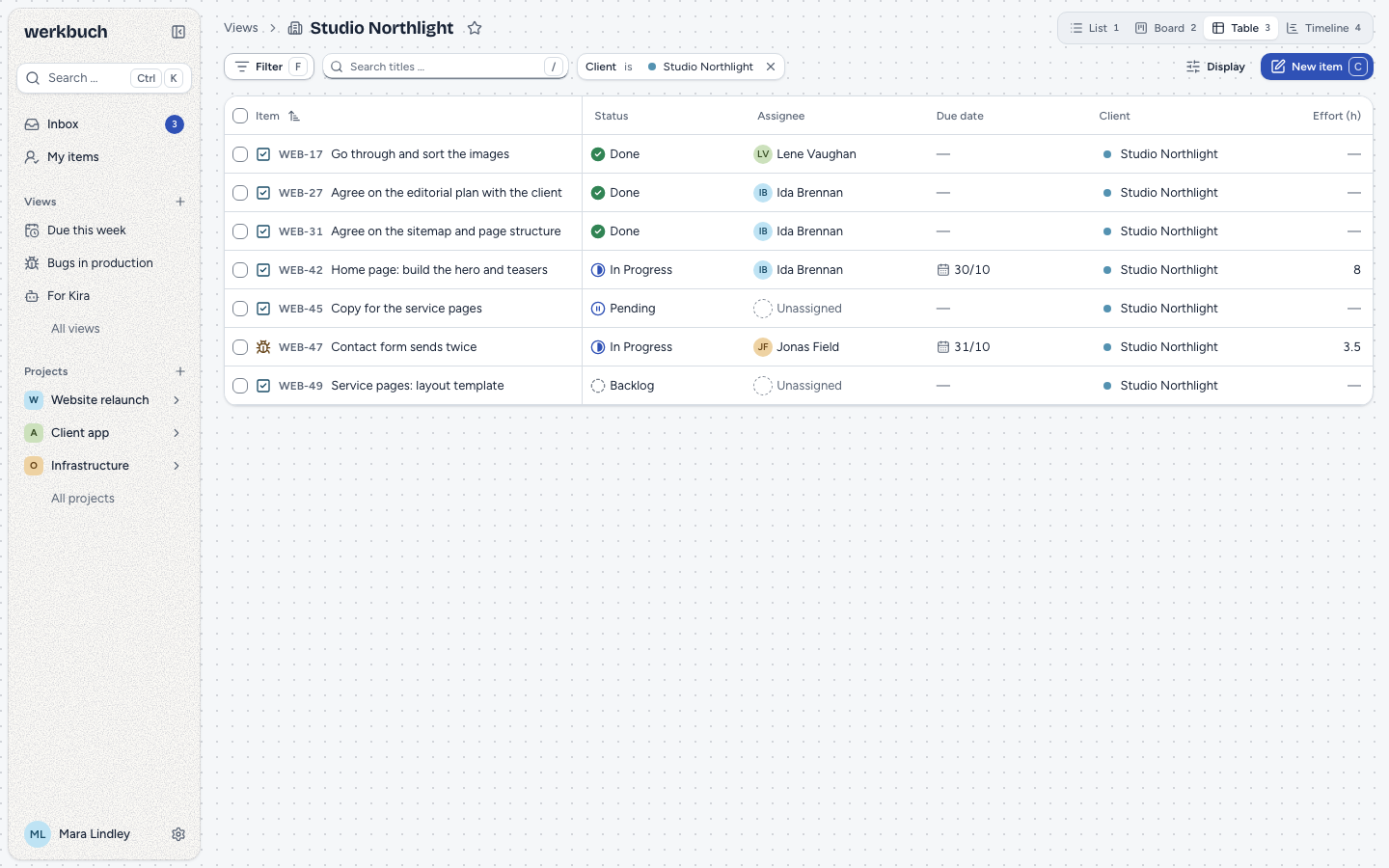
One row per item, one column per field of the display, properties included. The head and the first column (key and title) stay in place while you scroll. Cells can be changed in place: enter opens the editor of a cell, escape closes it. Cells of properties the type of the item does not have show "—". Project, created and changed cannot be changed here.
Timeline
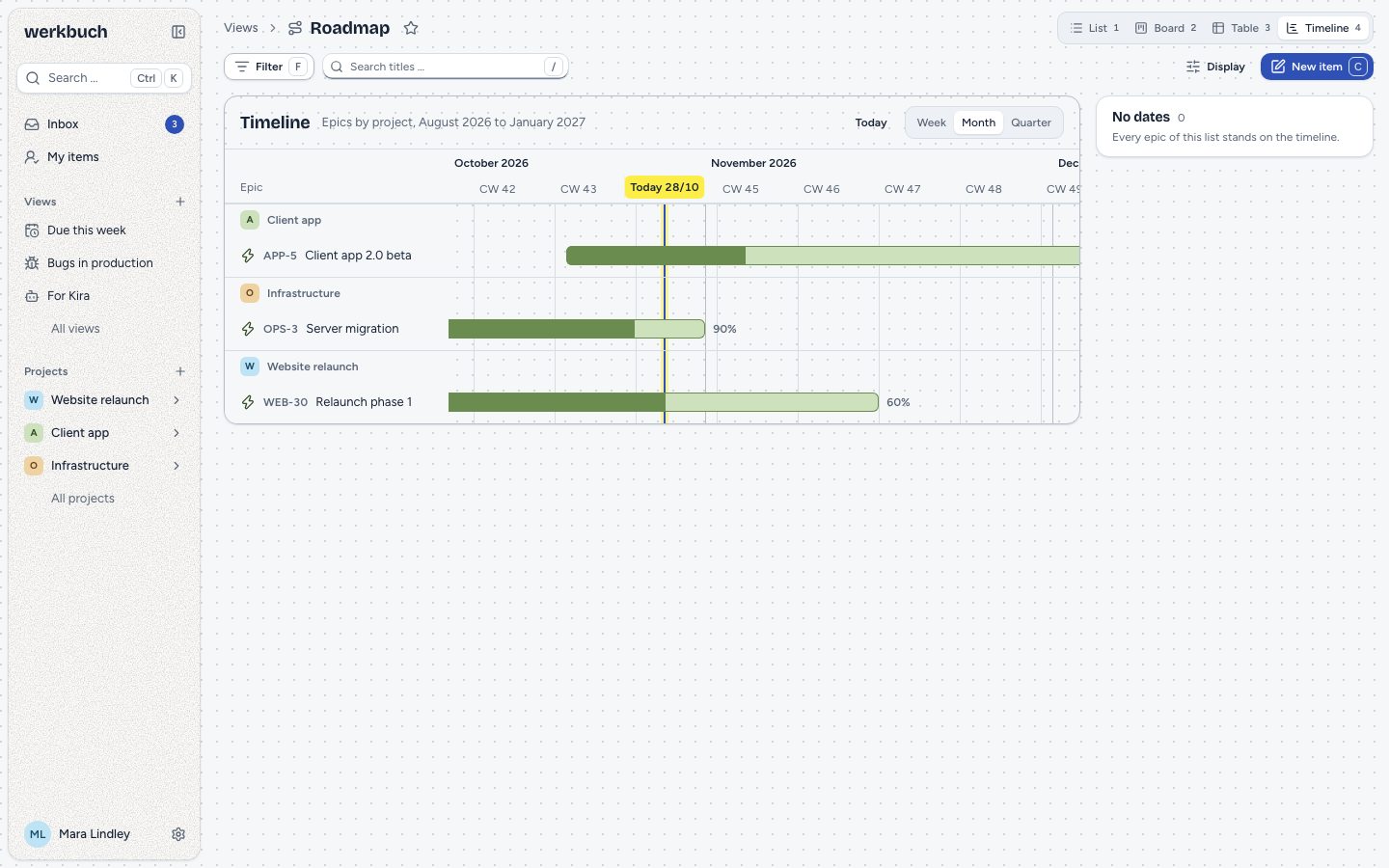
The timeline shows the epics of the list (items of a type marked "Epic"), grouped by project and ordered by start date, whatever the grouping and the sort of the display say. A bar runs from the start date to the due date and is filled by the share of closed child items. Drag a bar to move it and its ends to change one date. Epics without dates stand in the side list No dates; drag them onto the axis, or use Plan from today (two weeks from today). The zoom (week, month, quarter) stays in the address as ?zoom=week or ?zoom=quarter; Today scrolls to today.
Grouping
| Grouping | Groups, in this order | Empty groups |
|---|---|---|
| Status | The order of the workflow | All states of the workflow |
| Category | Backlog, Unstarted, Started, Completed, Canceled | All five |
| Assignee | People before bots, by name; "Unassigned" last | "Unassigned" always |
| Priority | Urgent, High, Medium, Low, None | All five |
| Type | The order of the catalog | The enabled types of the one project the filter names, else none |
| Label | By name; "No label" last | "No label" always |
| Project | By name | The one project the filter names |
| Parent item | By key; "No parent item" last | "No parent item" always |
| None | One group | — |
Grouping by status works only while all items found share one workflow; otherwise werkbuch groups by category and says so above the list. An item with two labels stands in both label groups, and counts once in the total.
Sorting
| Sort | Over the API (sort.field) | Order (ascending) |
|---|---|---|
| Manual | rank | The order you give items by dragging (rank) |
| Priority | priority | Urgent first |
| Due date, start date | due_date, start_date | Earliest first |
| Created, changed | created_at, updated_at | Oldest first |
| Key | key | Identifier of the project, then the number (A2-1 before A10-1, WEB-9 before WEB-10) |
| Category | state_category | Backlog first |
| A property (number, date, text or address) | property:<key> | Smallest, earliest or alphabetical first (Item 9 before Item 10) |
Items without a value come last in both directions; equal values keep the manual order. Texts and identifiers are compared without regard to case and accents, and numbers in them as numbers: Item 9 comes before Item 10, Version 1.2 before Version 1.10. Leading zeros do not count (Item 007 and Item 7 are equal), and only the digits 0 to 9 are numbers.
Filters
A filter is a list of conditions that all must hold. Each condition has a field, an operator and, for most operators, a value. In the interface, f or Filter adds a condition and / searches in the title; over the API, a filter is JSON in the same form everywhere:
{
  "version": 1,
  "conditions": [
    { "field": "assignee", "op": "is", "value": "me" },
    { "field": "state_category", "op": "in", "value": ["unstarted", "started"] },
    { "field": "due_date", "op": "before", "value": { "relative": "+7d" } },
    { "field": "property:customer", "op": "is", "value": "01m6dd2rc7syc8r8s7q2my2j51" }
  ]
}
A filter holds up to 50 conditions, a list up to 100 values, a text up to 255 characters. An unknown field, an operator the field does not offer or a value of the wrong form is refused (422 at filter.conditions.<n>.field, .op or .value), never silently ignored.
Fields
| Field | Kind | Notes |
|---|---|---|
project, type, state, created_by | ID | ULID; created_by also me |
assignee, parent | ID, may be empty | ULID; assignee also me |
state_category | Choice | backlog, unstarted, started, completed, canceled |
priority | Choice | urgent, high, medium, low, none |
label | List | ULIDs of labels |
start_date, due_date | Day | due_date also overdue |
created_at, updated_at, closed_at | Time | Compared by day; closed_at may be empty |
has_children, blocked, blocking, archived, epic, subscribed | Yes/no | epic: a type marked "Epic"; subscribed: you watch the item |
title | Text | Only contains |
property:<key> | By field type | See below |
Operators
| Kind | Operators |
|---|---|
| ID | is, is_not, in, not_in; is_empty, is_not_empty where the field may be empty |
| Choice | is, is_not, in, not_in |
| List | is, is_not, in, not_in, contains, is_empty, is_not_empty |
| Day | is, before, after, between, is_empty, is_not_empty; overdue only for due_date |
| Time | is, before, after, between; is_empty, is_not_empty only for closed_at |
| Yes/no | is |
| Text | contains; text and address properties also is, is_empty, is_not_empty |
| Number | is, gt, lt, between, is_empty, is_not_empty |
| Rich text | contains, is_empty, is_not_empty |
is and is_not take one value or a list, in and not_in a list. On a list field such as labels, is, in and contains mean "has one of them", is_not and not_in "has none of them". A missing value is never equal to anything, so is_not and not_in also match items without a value. before and after exclude the day itself, between takes two values and includes both. overdue takes no value: the due date is before today and the item is not in a Completed or Canceled state.
Values
| Value | Meaning |
|---|---|
"me" | The person reading the list. Only for assignee, created_by and person properties. |
"2026-11-02" | A day. |
"today", "this_week", "this_month" | Today, the current week, the current month. |
{ "relative": "+7d" } | Days or weeks from today: -3d, +2w, up to five digits. |
true, false | For yes/no fields. |
| A number | For number properties, below 10²⁰ in amount. |
| A text | For contains and is on texts, 1 to 255 characters. |
The dynamic values work only where the field takes them: "today" in a title search is the word "today". On a range such as this_week, is means "within it", before "before its first day" and after "after its last day".
Dates and time zone
"Today", weeks and months count in the time zone of the organization, and weeks start on the weekday it sets. For created, changed and closed, werkbuch compares the day the moment falls on in that time zone: an item created at 00:30 in Berlin counts as created that day, also in the summer and winter time change.
Properties
The operators of a property follow its field type:
| Field type | Kind | Operators |
|---|---|---|
| Dropdown, person (one value) | ID | is, is_not, in, not_in, is_empty, is_not_empty |
| Dropdown, person (several values) | List | is, is_not, in, not_in, contains, is_empty, is_not_empty |
| Date | Day | is, before, after, between, is_empty, is_not_empty |
| Yes/no | Yes/no | is |
| Number | Number | is, gt, lt, between, is_empty, is_not_empty |
| Text, address | Text | contains, is, is_empty, is_not_empty |
| Rich text | Rich text | contains, is_empty, is_not_empty |
A condition on a property (property:<key>) only ever matches items whose type has the property, also with is_empty, is_not, not_in and is false. A yes/no property that was never set reads as "no". Texts are compared without regard to case and accents ("uber" finds "Über"); rich text is searched in its plain text. When a property is deleted, a saved view keeps its condition, which then matches nothing and shows as "Unknown field" until you remove it.
Archived items
Archived items stay out of every list, unless a condition on archived asks for them or the request sets include_archived. Items of an archived project show up only where a project condition with is or in names the project: the list of an archived project shows its open items, read-only.
State in the address
Everything you change in a list stands in its address, as far as it differs from the saved view or the built-in list: filter (the conditions as JSON), layout, group, sort (due_date:desc), fields (comma-separated), sub (0 hides child items) and, in the timeline, zoom. A link shows the same list to someone else, and reloading the page keeps it. Discard goes back to the saved state.
Keyboard
? lists every shortcut that applies at the moment.
Lists
| Keys | Action |
|---|---|
j, k or down, up | Next or previous item |
shift+j, shift+k or shift+down, shift+up | Extend the selection |
x | Select the item |
shift+x | Select the range up to the item |
mod+a | Select all (loads every page first) |
escape | Clear the selection |
enter | Open the item |
space | Show or close the preview |
f | Add a condition |
/ | Filter by title |
1, 2, 3, 4 | List, board, table, timeline |
The item shortcuts (s status, a assign, i assign to me, p priority, l labels, t type, d due date, shift+d start date, shift+p parent, mod+backspace archive or delete) act on the selection, or else on the item under the cursor. With several items selected, a bar above the list changes status, assignee, priority and labels of all of them at once, and archives them when all are closed. An action applies to a selection only when it is allowed for every selected item: when some of them are archived or belong to a project you only read (or, for archiving, some are still open), the bar leaves the action out, so does the palette, and its shortcut says why without changing anything. mod+backspace archives a selection only when all its items are closed and deletes it only when none is closed (open and archived items alike); when it would archive some and delete others, it does nothing and says why. What the server still refuses for one item, such as a transition its workflow forbids, is named in a single toast. e edits the title only in the preview and on the item page.
Group headings are not tab stops: left on an item goes to the heading of its group; on a heading, left folds, right unfolds or goes to the first item, down and up go to the next or previous heading.
Board
| Keys | Action |
|---|---|
left, right | Column to the left or right |
j, k or down, up | Next or previous card in the column |
shift+left, shift+right | Move the card to the nearest column it may go to |
alt+up, alt+down | Move the card up or down (sort "Manual" only) |
escape while dragging | Cancel the drag |
The command palette (mod+k) offers the same moves, as long as they are possible.
Table
The table is a grid with one tab stop:
| Keys | Action |
|---|---|
left, right | Previous or next column |
up, down | Previous or next row; with shift they extend the selection |
home, end | First or last column; with mod the first or last row |
enter | Open the editor of the cell (on the first column: the item) |
escape | Close the editor |
j, k, x and space work as in the list, and so do the keys of the group headings.
Timeline
| Keys | Action |
|---|---|
shift+left, shift+right | Move the epic one unit of the zoom (day, week, month) earlier or later; shift+right plans an epic without dates from today |
alt+left, alt+right | Make the epic shorter or longer (its due date) |
Moves are saved after a short pause; escape while dragging puts the bar back. The command palette (mod+k) offers the same moves, as long as they are possible.
REST
Reading needs a token with read. The three requests below that read with POST (query, groups, counts) are reads too: a token with only read may send them. Creating, changing and deleting views needs write. Messages come in the language of the account. Tokens, errors, pages and limits are explained on the page REST API; the list of views takes filter[created_by], filter[name] and sort like every list there.
| Request | Answer |
|---|---|
GET /api/v1/work-items | A page of items: view, filter[…] (short form), sort, show_sub_items (1 or 0, by default as the view says, otherwise 1), include_archived, lean, cursor, per_page |
POST /api/v1/work-items/query | A page of items for a filter in the body |
POST /api/v1/work-items/groups | The groups of a grouping with their numbers |
POST /api/v1/work-items/counts | Numbers for up to 50 named filters |
GET, POST /api/v1/views | The views, by name; 201 with a new one |
GET, PUT, DELETE /api/v1/views/{id} | One view; PUT replaces it as a whole; 204 |
POST /api/v1/favorites/toggle | {"kind": "view", "id": "…"} stars a view or takes the star away |
Read a view
?view=<id> returns the items of a view: its filter, its sort and whether it shows child items. filter[…] narrows it further (all conditions hold), sort replaces its sort: the API name from Sorting, with - in front for descending (sort=-due_date).
curl -g -H "Authorization: Bearer <Token>" \
  "https://werkbuch.example.com/api/v1/work-items?view=01m6dd2re3zvh9g281chdw9hmv&filter[state_category]=unstarted,started&sort=-due_date&lean=1"
The short form takes these keys; several values are separated by commas and mean "one of them":
| Key | Value |
|---|---|
project | Identifier, former identifier or ULID; unknown or hidden is a 404 |
parent | Key or ULID of an item; unknown or hidden is a 404 |
q | A key (WEB-47) finds this item, any other text searches the title |
assignee, created_by | ULIDs or me; none alone for "nobody" |
type, state, label | ULIDs |
state_category | backlog, unstarted, started, completed, canceled |
priority | urgent, high, medium, low, none |
archived | true or false |
sort takes a field (due_date), a field with - for descending (-due_date) or a property (property:effort). lean=1 leaves out description, description_json and values_markdown, which makes long lists much smaller. Any other key of filter[…] is a 422.
Query with a filter
POST /api/v1/work-items/query takes a filter in the body. Besides filter it takes view_id, shorthand (the short form as an object), q, sort ({"field", "direction"}), show_sub_items, group_by and group (one group of a grouping, for example one column of a board), include_archived, lean, cursor and per_page. Any other key is a 422.
curl -X POST https://werkbuch.example.com/api/v1/work-items/query \
  -H "Authorization: Bearer <Token>" \
  -H "Content-Type: application/json" \
  -d '{
    "filter": { "version": 1, "conditions": [
      { "field": "assignee", "op": "is", "value": "me" },
      { "field": "due_date", "op": "before", "value": { "relative": "+7d" } },
      { "field": "state_category", "op": "in", "value": ["unstarted", "started"] }
    ] },
    "sort": { "field": "due_date", "direction": "asc" },
    "lean": true,
    "per_page": 50
  }'
The answer is a page as in every list, with the items in data. A filter that does not fit is refused with every problem at once:
{
  "type": "urn:werkbuch:problem:validation_failed",
  "title": "Validation failed",
  "status": 422,
  "detail": "The input is not valid.",
  "reason": "validation_failed",
  "errors": {
    "filter.conditions.0.field": ["This field does not exist."],
    "filter.conditions.1.op": ["This field does not offer this operator."]
  }
}
Groups
POST /api/v1/work-items/groups takes view_id, filter, q, sort, show_sub_items, include_archived and group_by (required), and answers with the grouping that applies, the number of all items and the groups in their order:
curl -X POST https://werkbuch.example.com/api/v1/work-items/groups \
  -H "Authorization: Bearer <Token>" \
  -H "Content-Type: application/json" \
-d '{"view_id": "01m6dd2re4m3z0aez8e2qzc19p", "group_by": "state"}'{
"data": {
"group_by": "category",
"total": 3,
"groups": [
{ "key": "backlog", "count": 1 },
{ "key": "unstarted", "count": 0 },
{ "key": "started", "count": 2 },
{ "key": "completed", "count": 0 },
{ "key": "canceled", "count": 0 }
]
}
}Here the items span several workflows, so the server groups by category. Read the items of one group with query, the same group_by as in the answer and "group": "<key>". Groups of a parent item carry the item (id, key, title, type_id).
Counts
POST /api/v1/work-items/counts counts up to 50 named filters at once. Names are 1 to 64 letters, digits, _, ., : or -; include_archived applies to all.
curl -X POST https://werkbuch.example.com/api/v1/work-items/counts \
  -H "Authorization: Bearer <Token>" \
  -H "Content-Type: application/json" \
  -d '{
    "filters": {
      "overdue": { "version": 1, "conditions": [{ "field": "due_date", "op": "overdue" }] },
      "mine": { "version": 1, "conditions": [{ "field": "assignee", "op": "is", "value": "me" }] }
    }
}'{ "data": { "overdue": 10, "mine": 8 } }Groups and counts only count what the account of the token sees. A filter on a project it does not see counts 0, as if the project did not exist.
Pages and cursors
A page holds up to 100 items (per_page, 100 by default); meta.total counts all of them, meta.next_cursor leads on. With GET, follow links.next: it keeps the query (view, filter, sort, per_page). With POST, links.next is null: send the same request again with cursor set to meta.next_cursor; the sort decides the order, ties are broken by the manual order and the ULID, so every item comes exactly once. A cursor belongs to its sort and group: one from another list is a 422 at cursor, and an empty cursor starts at the first page.
Manage views
curl -X POST https://werkbuch.example.com/api/v1/views \
  -H "Authorization: Bearer <Token>" \
  -H "Content-Type: application/json" \
  -d '{
    "name": "Overdue at Nordlicht",
    "icon": "timer",
    "filter": { "version": 1, "conditions": [
      { "field": "property:customer", "op": "is", "value": "01m6dd2rc7syc8r8s7q2my2j51" },
      { "field": "due_date", "op": "overdue" }
    ] },
    "display": {
      "layout": "table",
      "group_by": "assignee",
      "sort": { "field": "due_date", "direction": "asc" },
      "fields": ["key", "title", "state", "assignee", "due_date", "property:customer"],
      "show_sub_items": true
    }
  }'
All four parts are required, also for PUT, which replaces the view as a whole; sending back an answer unchanged changes nothing. display takes layout (list, board, table, timeline), group_by (state, category, assignee, priority, type, label, project, parent, none), sort, fields (up to 30: key, title, state, assignee, priority, labels, start_date, due_date, project, created_at, updated_at and property:<key>) and show_sub_items.