

Templates
A template creates work items with fixed fields: a weekly maintenance, the monthly report, the checklist for a new client. You apply it by hand in the create dialog, or give it a schedule, and the default bot "Automation" creates the item at the set time. Every project has its own templates (/projects/WEB/templates): under Templates on its card, in the tabs below the header of the project, through Open templates … in the command palette and in the sidebar below a starred project.
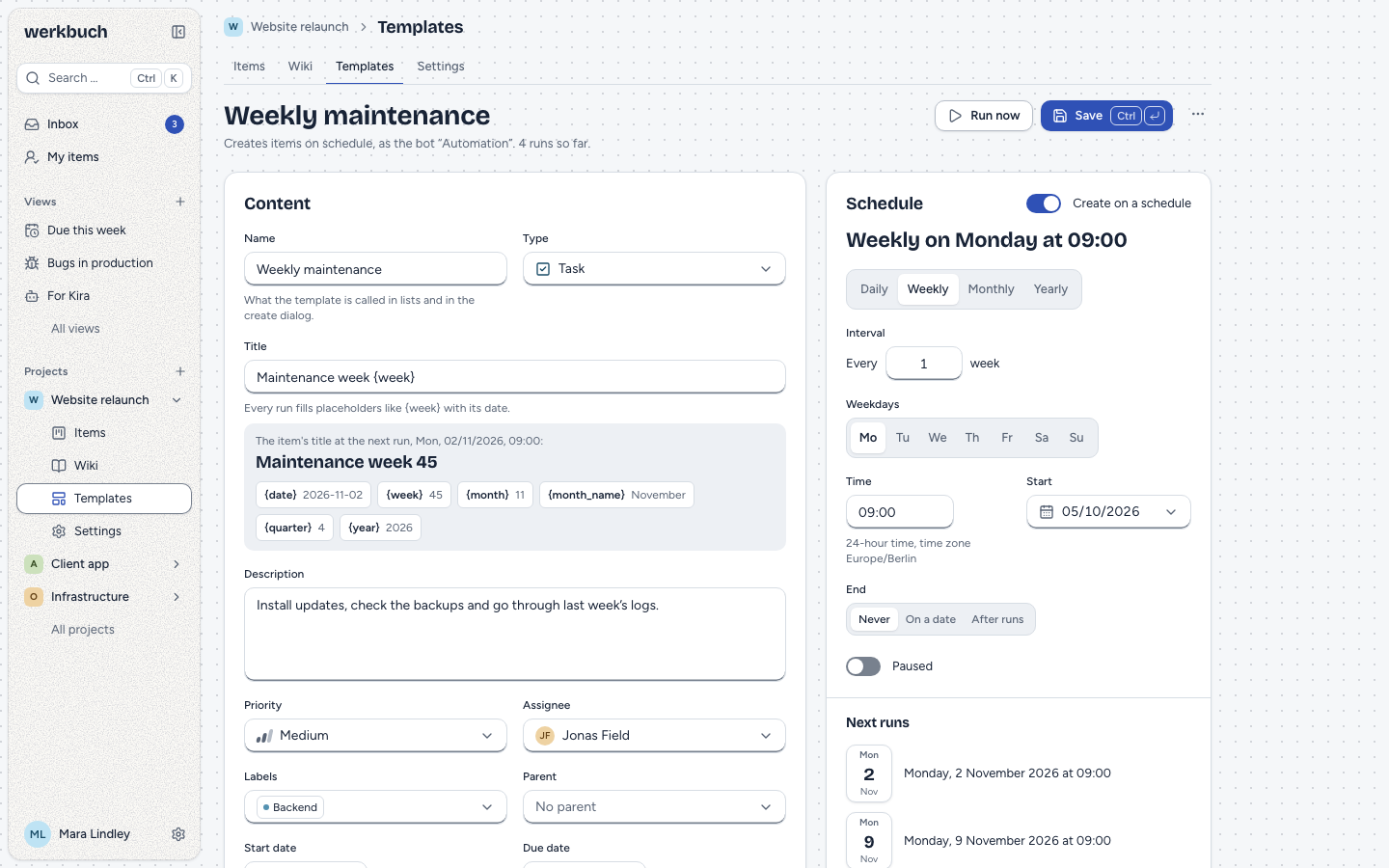
Creating a template
New template opens the editor. A template holds what an item gets:
| Field | Notes |
|---|---|
| Name | Up to 120 characters; what the template is called in lists and in the create dialog. Names need not be unique. |
| Type | One of the types switched on in the project. |
| Title | The title of the item, with placeholders such as {week}. Filled with the longest value of each placeholder, it is at most 255 characters. |
| Description | Rich text like in an item: /, mentions, references, images and files. |
| Priority, assignee, labels, parent item | Like in an item; a parent item only for a type that can have one (an epic of the project). |
| Properties | The fields of the type. A required one may stay empty while you save (it says "Required: without a value the run fails"); the run then fails until it has a value. |
| Start date, due date | As offsets in days. |
The editor saves only when you ask it to: Save or ⌘ / Ctrl+↵ (holding the keys saves once). Leaving with changes asks first. When two people edit the same template, the last save wins: a save replaces the whole template.
A template keeps what it already holds when the catalog changes: an archived option, an archived type, an assignee or a person in a people property who left the project stay as they are, and saving still works (also to pause a schedule). A label that was deleted, or a value of a property its type no longer has, is left out the next time the template is saved. Runs treat these parts as described under errors.
Placeholders
The title may contain placeholders. Each run fills them with its own date, in the time zone of the organization; applied by hand, they get the date of now. Insert a placeholder next to the title lists them with an example, and the preview under the title shows the title of the next run.
| Placeholder | Means | Example for Monday 2 November 2026 |
|---|---|---|
{date} | The day as YYYY-MM-DD | 2026-11-02 |
{week} | The ISO calendar week, two digits | 45 (05 in early February) |
{month} | The month as a number, two digits | 11 |
{month_name} | The name of the month in the language of the organization | November |
{quarter} | The quarter, 1 to 4 | 4 |
{year} | The year | 2026 |
Maintenance week {week} becomes "Maintenance week 45", Monthly report {month_name} {year} "Monthly report November 2026". A placeholder werkbuch does not know, such as {day}, stays as text. On 31 December 2026, {week} is 53: the ISO week of a day near the turn of the year can belong to the other year.
Dates as offsets
Start and due date are days after the item is created: 0 is the same day, 2 two days later, empty means no date. Offsets are whole numbers from 0 to 3650; the due date cannot lie before the start date. The days are counted on the calendar of the organization: a template with due date 2, run on Monday, gives an item due on Wednesday.
Images and files
Images and files in the description and in rich text properties belong to the template. Each time it is applied, werkbuch copies them: every item gets its own copy, which stays when the template is changed or deleted. A file of the template appears in the text of the item, never in its file list. When an item cannot be created, its copies have no owner and the hourly cleanup removes them after 24 hours.
Deleting a template hands an image over to another text of the project that still shows it (an item, a comment, a page or another template); the rest is deleted with the template.
Applying a template
- In the create dialog (C), the field Template fills type, title (with the placeholders filled now), description, fields and dates. You can change all of it before creating. A notice under the fields says so; its Undo button (the next stop after the field with Tab) brings back what was there before, until you change the draft. When you keep writing while the template loads, it is not applied and a toast says so. No template lets go of it and keeps the fields.
- In the command palette, Apply template … lists the templates of the projects in which you may create items and opens the create dialog with the one you pick.
An item made from a template remembers it (template_id) and its history says "From template "…"", with the name the template had then. Applied by hand, the item is created by you. Items its texts reference with # are related to the new item, as long as the project has Link referenced items on.
Schedule
Create on a schedule gives a template a schedule. The editor shows the schedule as a sentence ("Every first Monday of the month at 09:00") and lists the next runs, as the server computes them.
Frequencies
| Frequency | Settings |
|---|---|
| Daily | Every 1 to 999 days. |
| Weekly | Every 1 to 999 weeks, on one or more weekdays. Weeks count from the Monday of the week of the start; without a weekday, the weekday of the start. |
| Monthly | Every 1 to 999 months, on a day (1 to 31, or the last day) or on a weekday of the month (the first to fourth, or the last Monday, Tuesday, …). A month without the day takes its last day: the 31st runs on 30 April and on 28 or 29 February. |
| Yearly | Every 1 to 999 years, on a day of the year. 29 February runs on 28 February in other years. |
Time and time zone
The time is a time of the day (HH:MM, 24 hours) in the time zone of the organization, which the editor names. It stays the same wall-clock time all year: 09:00 is 09:00 in summer and in winter. A time that does not exist because the clocks go forward (02:30 on 28 March 2027 in Berlin) runs at 03:30; a time that happens twice because the clocks go back (02:30 on 25 October 2026) runs the first time.
Start, end and pause
The schedule begins on its start day (between 2000-01-01 and 2099-12-31). It ends never, on a date (the last run is on that day at the latest) or after a number of runs (1 to 9999). Runs on the schedule count, failed ones too; Run now does not. A schedule without a single run, such as one that ends before its first weekday, cannot be saved.
Paused stops the schedule: no items, until you switch it back on. Run now still works. Resuming does not catch up what fell into the pause.
An example
The template "Monatsbericht" of the demo project APP runs every first Monday of the month at 09:00. Seen on 28 October 2026, its next runs are 2 November 2026, 7 December 2026, 4 January 2027, 1 February 2027 and 1 March 2027, each at 09:00.
Running
The scheduler looks for due templates every minute. A run creates exactly one item per term, as the default bot "Automation", with the history entry "From template "…"".
- On time: a term runs in the minute it is due.
- After an outage: when the scheduler was down (maintenance, a crash), only the last missed term is caught up, once. With an end after a number of runs, never more than that number.
- Nothing in hindsight: a schedule counts from the moment it was saved. A new template whose start lies in the past creates nothing for the past; saving a changed schedule, resuming a paused one, restoring an archived project and changing the time zone of the organization start the schedule anew from that moment.
- Archived projects run no templates. Their schedule starts anew when the project is restored.
- Time zone of the organization: after a change, the terms count in the new time zone. No term of the old one is caught up, and no day gets a second item.
php artisan app:run-templates --nowruns the due templates at once in its own process, for example after maintenance; a template that fails is reported and the others run all the same.
Run now (in the editor, or as a command of the palette) creates one item at once from the saved template: save your changes first. It acts as the default bot as well, and the log names who pressed it. It does not count towards the schedule: the number of runs, the next run and an end after a number of runs stay as they are.
Errors and the log
A run fails when the item cannot be created: the assignee is no longer in the project, the type is switched off or archived, a required property has no value, an archived option is set, the parent item is gone or no epic, or the title is longer than 255 characters. Labels that were deleted and values of properties the type no longer has are left out silently; they do not make a run fail.
A failed run creates nothing. The template stays as it is, and the next term runs as usual. The reason is written in the language of the organization, such as "Required property Customer is missing". The lead of the project and the author of the template get the notification "Template failed" (see notifications); it leads to the template. When a run on the schedule cannot finish at all, even after three tries, it is booked as failed with "Internal error while creating the item", so the next term is not held up.
The Log of a template lists every run, the newest first: when, whether on the schedule or by hand (with the person), and the item it created or the reason it failed. The list of templates shows the schedule as a sentence and the next run of each one.
Permissions
- Members and admins of the project create, change, delete and run templates; org admins do so in every project, bots only as members.
- Viewers and people outside a public project read the templates and their logs, without the editor.
- Archived projects keep their templates readable; saving, deleting and Run now are refused with
409 project_archived, and no schedule runs. - Saved meanwhile: when the template is saved again and again while Run now prepares, the run gives up after three tries and answers
409 template_changed; nothing is created, try again. - Applying a template in the create dialog needs the right to create items in its project.
REST
Reading needs a token with read, changing one with write. Projects are addressed by ULID, identifier or former identifier, templates and runs by ULID. A template or project the account of the token does not see is a 404; a viewer who tries to change something gets 403 with "Only members and admins of the project manage templates."
| Request | Answer |
|---|---|
GET /api/v1/templates | The templates of every project the account sees, by name; filter[project_id]=<id> narrows to one (a project you do not see gives an empty list), filter[scheduled]=1 keeps the scheduled, ?lean=1 leaves out the texts. With cursor and per_page. |
GET /api/v1/projects/{project}/templates | The templates of one project. |
POST /api/v1/projects/{project}/templates | 201 with the new template: name, payload, schedule (all required, schedule may be null). |
GET /api/v1/templates/{template} | One template. |
PUT /api/v1/templates/{template} | 200; replaces the whole template. Sending back its own answer changes nothing. |
DELETE /api/v1/templates/{template} | 204. Items made from it stay. |
GET /api/v1/templates/{template}/draft | The fields an item gets when the template is applied now. |
POST /api/v1/templates/preview | The next five runs of a schedule and the title at the first of them (a read, a token with read is enough). |
POST /api/v1/templates/{template}/run | Run now: 200 with {run, item}, also when the run failed. |
GET /api/v1/templates/{template}/runs | The log, the newest first, with cursor and per_page. |
Create a template
payload holds the fields of the item. The description comes as Markdown in payload.description or as Tiptap JSON in payload.description_json, not both; values holds the properties by their key. schedule is null or a schedule: frequency (daily, weekly, monthly, yearly), interval, the field of the frequency (weekdays with 0 for Sunday to 6 for Saturday, month_day 1 to 31 or "last", nth_weekday {n, weekday} with n 1 to 4 or -1 for the last, yearly_date MM-DD), time, starts_on, ends ({"type": "never"}, {"type": "on", "date": "…"} or {"type": "count", "count": n}) and paused.
curl -X POST https://werkbuch.example.com/api/v1/projects/APP/templates \
  -H "Authorization: Bearer <token>" \
  -H "Content-Type: application/json" \
  -d '{
    "name": "Monthly report",
    "payload": {
      "type_id": "01m6akx7247gfm80md352w7wra",
      "title": "Monthly report {month_name} {year}",
      "description": "- hours\n- open items\n- next steps",
      "priority": "medium",
      "assignee_id": "01m6akx65qgwfz2m2tz3bpt7st",
      "label_ids": [],
      "values": {},
      "parent_id": null,
      "start_offset_days": 0,
      "due_offset_days": 4
    },
    "schedule": {
      "frequency": "monthly",
      "interval": 1,
      "nth_weekday": { "n": 1, "weekday": 1 },
      "time": "09:00",
      "starts_on": "2026-11-01",
      "ends": { "type": "never" },
      "paused": false
    }
  }'
The answer (201, shortened):
{
  "data": {
    "id": "01m6d3t8q4w2e6r0y5v9h3n7pa",
    "project_id": "01m6akx72yptw2aw6n30m5fg0a",
    "name": "Monthly report",
    "payload": {
      "title": "Monthly report {month_name} {year}",
      "description": "- hours\n- open items\n- next steps",
      "description_json": { "type": "doc", "content": ["…"] },
      "due_offset_days": 4,
      "…": "…"
    },
    "schedule": { "frequency": "monthly", "interval": 1, "nth_weekday": { "n": 1, "weekday": 1 }, "time": "09:00", "…": "…" },
    "run_count": 0,
    "last_run_at": null,
    "next_run_at": "2026-11-02T08:00:00.000000Z",
    "created_by": "01m6akx65qgwfz2m2tz3bpt7st"
  }
}
next_run_at is in UTC: 09:00 in Berlin is 08:00 UTC in winter. To change the template, send it back whole with PUT, the description as description_json only.
Preview a schedule
curl -X POST https://werkbuch.example.com/api/v1/templates/preview \
  -H "Authorization: Bearer <token>" \
  -H "Content-Type: application/json" \
-d '{"schedule": {"frequency": "monthly", "interval": 1, "nth_weekday": {"n": 1, "weekday": 1}, "time": "09:00", "starts_on": "2026-09-01", "ends": {"type": "never"}, "paused": false}, "title": "Monthly report {month_name} {year}"}'{
"data": {
"runs": [
"2026-11-02T08:00:00.000000Z",
"2026-12-07T08:00:00.000000Z",
"2027-01-04T08:00:00.000000Z",
"2027-02-01T08:00:00.000000Z",
"2027-03-01T08:00:00.000000Z"
],
"title": "Monthly report November 2026"
}
}run_count (optional) is the number of runs so far, for an end after a number of runs. A paused or ended schedule has no runs. The month names come in the language of the organization.
Apply a template
GET …/draft answers the fields of the item as they are now (title with the placeholders filled, start_date and due_date from the offsets, description_json naming the images of the template). Send them with template_id to POST /api/v1/work-items: werkbuch copies the images, and the item notes the template. A template_id of another project is a 422.
Run now
curl -X POST -H "Authorization: Bearer <token>" \
https://werkbuch.example.com/api/v1/templates/01m6d3t8q4w2e6r0y5v9h3n7pa/run{
"data": {
"run": {
"id": "01m6d4a1s2d3f4g5h6j7k8m9zx",
"template_id": "01m6d3t8q4w2e6r0y5v9h3n7pa",
"scheduled_for": null,
"ran_at": "2026-11-05T10:12:31.204517Z",
"status": "created",
"work_item_id": "01m6d4a1v8b7n6m5c4x3z2q1wa",
"error": null,
"triggered_by": "01m6akx65qgwfz2m2tz3bpt7st"
},
"item": { "id": "01m6d4a1v8b7n6m5c4x3z2q1wa", "key": "APP-26", "title": "Monthly report November 2026", "…": "…" }
}
}A failed run answers 200 as well, with status failed, the reason in error and item null. scheduled_for is the term of a run on the schedule, null for one by hand. GET …/runs lists the runs in the same form.
Errors
A template that cannot be saved answers 422 with every field error at once: payload.<field> (payload.title for a title that would be too long, payload.values.<key>), schedule.<field> for a schedule that cannot be read, and schedule for one without a single term ("This schedule has not a single term. Check the start, the weekdays and the end.").