

Webhooks
A webhook tells another system about changes in werkbuch: a deploy script, a chat, a CRM or an AI agent. werkbuch sends each event it is subscribed to as a signed JSON POST to its address, tries again for about 24 hours when the receiver does not answer, and keeps a log of every attempt. Over the API, webhooks are GET /api/v1/webhooks.
Set up a webhook
Only org admins manage webhooks: Settings → Operations → Webhooks → Create webhook. A token of the default bot may do it over REST too, since the default bot is an org admin; everybody else gets 403 (see roles and permissions).
- Name: up to 120 characters, so you recognize the webhook in the list and in the log. Names need not be unique.
- URL:
httporhttps, at most 2048 characters, without a user or password in it. werkbuch never follows a redirect, so give the final address. Addresses in private networks are blocked (see Private networks). - Scope: the whole organization or one project. A project webhook only gets the events of its project; it goes when its project is deleted.
- Events: single events or a whole group. When you tick every event of a group, werkbuch stores the group as
group.*(for examplework_item.*); that also takes events a later version adds to the group. A webhook without a matching event gets nothing. - Only for one bot (optional): the webhook gets only what this bot may see and what concerns it (see Agents).
- Active: off means nothing is sent; events from that time are not sent later when you switch it on again.
When you create the webhook, werkbuch shows its secret once: whsec_ and 43 more characters. Copy it to the receiver right away. Later you can only make a new one (Make a new secret), which replaces the old one at once, also for retries still waiting; there is no time with two valid secrets. werkbuch keeps the secret encrypted with APP_KEY and never shows it in the list, the log, events or error texts.
Who reads the payload. data is written for one reader, as the REST API would answer them: with a bot, the bot (its role, the items it may see, hidden relations and references stay hidden); without a bot, the default bot, which is an org admin. So a project webhook without a bot names references and relations into other projects with their key, like an org admin would see them. If you do not want that, choose a bot with the right memberships.
Events
| Event | When |
|---|---|
project.created | A project was created |
project.updated | Name, identifier, description, lead, visibility, workflow or types changed |
project.archived | A project was archived |
project.restored | An archived project was restored |
project.deleted | A project was deleted (only organization webhooks get it) |
project.member_added | Someone joined or was added to a project |
project.member_removed | Someone was removed from a project |
work_item.created | An item was created |
work_item.updated | Fields of an item changed: title, description, priority, dates, labels, properties, type, parent, resolution, rank, files |
work_item.state_changed | An item moved to another state |
work_item.assigned | An item got another assignee or none |
work_item.archived | An item was archived |
work_item.restored | An archived item was restored |
work_item.deleted | An item was deleted |
work_item.relation_added | A relation was added; each end gets its own event |
work_item.relation_removed | A relation was removed; each end gets its own event |
comment.created | A comment was written |
comment.updated | A comment was edited |
comment.deleted | A comment was deleted |
page.created | A wiki page was created |
page.updated | A wiki page was saved or a version restored |
page.moved | A wiki page was moved or put into another order |
page.deleted | A wiki page was deleted with its subpages |
bot.mentioned | A bot was mentioned in a description, a rich text property or a comment |
bot.assigned | An item was assigned to a bot by someone else |
template.run_failed | A run of a template failed |
Changes to catalogs (workflows, types, properties, labels), to templates and automations, to accounts, views, tokens and to webhooks themselves have no webhook. The nightly automations are sent like any change: when auto-close cancels 30 items, a work_item.state_changed webhook gets 30 deliveries (they are silent only for notifications).
Payload
Every delivery is one JSON object:
{
  "id": "01m6b2q7h2m8d4f6g9k1p3s5tv",
  "event": "work_item.state_changed",
  "occurred_at": "2026-11-04T08:12:31.204517Z",
  "actor": { "id": "01m6akw3g1r5t8v2x4z7b9d3fh", "type": "person", "name": "Mara Lindqvist", "handle": "mara" },
  "project": { "id": "01m6akx0c4e7h2j5m8n1q3s6vw", "identifier": "WEB" },
  "data": {
    "id": "01m6akyecnp503vn6jmb8sp249",
    "key": "WEB-47",
    "title": "Kontaktformular sendet doppelt",
    "state_id": "01m6akv9p3r6t8w1y4b7d2f5hk",
    "assignee_id": "01m6akw3g1r5t8v2x4z7b9d3fh",
    "description": "Steps to reproduce: …"
  },
  "changes": {
    "state_id": { "old": "01m6akv9n8q2s5v7x9z3c6e1gj", "new": "01m6akv9p3r6t8w1y4b7d2f5hk" }
  }
}idis the ID of the event (of the delivery for a ping).occurred_atis in UTC with microseconds.actoris who made the change: a person or a bot (typepersonorbot). Automations and template runs act as the default bot.projectis the project with its current identifier,nullfor events without a project.datais the subject as the REST API shows it to the reader (the item above is shortened), see the table below. It isnullwhen the subject is gone by the time the event is sent or the reader does not see it (any more).changesare the changed fields as{old, new},nullwhen there are none. A relation names the other end as{label, item_id, key}, or{label, hidden: true}when the reader does not see it. States are only IDs: a state that was renamed or removed since shows only its ID; read the workflow over REST.- Internal marks of an event (the browser tab that made it, on whose behalf an automation acted, who was newly mentioned) never leave the server.
The body is built once, a few seconds after the event, and sent unchanged by every attempt and by Send again. So data is the state of the subject at that moment, not exactly at occurred_at. A body over 1 MiB (a long description in Markdown and JSON, as old and new) goes out without changes, and if still too large, without data; a receiver cannot tell that from a subject that is gone. When data is null, read the subject over REST.
data per event
| Event | data |
|---|---|
project.* except deleted | The project as GET /api/v1/projects/{id} shows it |
project.deleted | {id, identifier, name} |
work_item.* except deleted | The item as GET /api/v1/work-items/{id} shows it: rich text as Markdown (description) and as JSON (description_json) |
work_item.deleted | {id, key, title} |
comment.created, comment.updated | The comment (body as Markdown and body_json) with its item in the short form of lists as work_item |
comment.deleted | {id, work_item_id, author_id}, no text |
page.created, page.updated, page.moved | The page with its content as Markdown and JSON |
page.deleted | {id, title, page_ids}: the deleted page and every page of its subtree |
bot.mentioned | {bot, item, source, comment}: source is description, values or comment; comment only while it exists |
bot.assigned | {bot, item} |
template.run_failed | The run (error says why) with its template as template |
comment.updated of a comment deleted since has neither data nor the old and new text in changes. Page events never carry the text in changes.
Headers
| Header | Value |
|---|---|
X-Werkbuch-Event | The event, ping for a test ping |
X-Werkbuch-Delivery | The ID of the delivery: the same in every attempt and in Send again |
X-Werkbuch-Timestamp | Unix seconds of this attempt |
X-Werkbuch-Signature | sha256= and the hex HMAC-SHA256 of <timestamp>.<body> with the secret |
Content-Type | application/json |
User-Agent | werkbuch/<version> |
Check the signature
A receiver checks every request before it trusts it:
- Read the body raw, exactly as it arrived, before parsing it as JSON (the signature covers those bytes).
- Compute HMAC-SHA256 over
X-Werkbuch-Timestamp, a dot and the body, with the secret as key, and comparesha256=<hex>withX-Werkbuch-Signaturein constant time. - Accept the timestamp only within 300 seconds of your clock, so a recorded request cannot be played again later.
A missing or malformed header is no valid signature. These functions do all three and answer true or false; werkbuch tests them against its own signing code:
import { createHmac, timingSafeEqual } from 'node:crypto';

/**
 * Checks a request from werkbuch: `X-Werkbuch-Signature` must be `sha256=` and the hex HMAC-SHA256 of
 * "<X-Werkbuch-Timestamp>.<body>" with the secret of the webhook, and the timestamp at most 300 seconds away from now
 * (against replays). Pass the body exactly as it arrived (a string or a Buffer), before parsing it as JSON.
 * A missing or malformed header is no valid signature: the function answers false, it never throws.
 *
 * @param {string} secret the secret of the webhook
 * @param {string | undefined} timestamp the header X-Werkbuch-Timestamp (Unix seconds)
 * @param {string | Buffer} body the raw body
 * @param {string | undefined} signatureHeader the header X-Werkbuch-Signature
 * @param {number} [now] Unix seconds, now by default
 * @returns {boolean}
 */
export function verifyWerkbuchSignature(secret, timestamp, body, signatureHeader, now = Math.floor(Date.now() / 1000)) {
  if (typeof timestamp !== 'string' || typeof signatureHeader !== 'string') return false;
  if (!/^\d{1,10}$/.test(timestamp) || Math.abs(now - Number(timestamp)) > 300) return false;

  const expected = Buffer.from(`sha256=${createHmac('sha256', secret).update(`${timestamp}.`).update(body).digest('hex')}`);
  const given = Buffer.from(signatureHeader);
  // compared in constant time; timingSafeEqual needs two buffers of the same length
  return given.length === expected.length && timingSafeEqual(given, expected);
}<?php
/**
* Checks a request from werkbuch: `X-Werkbuch-Signature` must be `sha256=` and the hex HMAC-SHA256 of
* "<X-Werkbuch-Timestamp>.<body>" with the secret of the webhook, and the timestamp at most 300 seconds away from now
* (against replays). Pass the body exactly as it arrived (`file_get_contents('php://input')`), before json_decode().
* A missing or malformed header is no valid signature: the function answers false, it never throws.
*
* @param string $secret the secret of the webhook
* @param int|string|null $timestamp the header X-Werkbuch-Timestamp (Unix seconds), null when it is missing
* @param string $body the raw body
* @param string|null $signatureHeader the header X-Werkbuch-Signature, null when it is missing
* @param int|null $now Unix seconds, now by default
*/
function verifyWerkbuchSignature(string $secret, int|string|null $timestamp, string $body, ?string $signatureHeader, ?int $now = null): bool
{
$sent = (string) $timestamp;
if ($signatureHeader === null || preg_match('/\A\d{1,10}\z/', $sent) !== 1 || abs(($now ?? time()) - (int) $sent) > 300) {
return false;
}
$expected = 'sha256='.hash_hmac('sha256', $sent.'.'.$body, $secret);
// compared in constant time
return hash_equals($expected, $signatureHeader);
}import hashlib
import hmac
import re
import time
def verify_werkbuch_signature(secret, timestamp, body, signature_header, now=None):
"""Checks a request from werkbuch.
`X-Werkbuch-Signature` must be `sha256=` and the hex HMAC-SHA256 of "<X-Werkbuch-Timestamp>.<body>" with the
secret of the webhook, and the timestamp at most 300 seconds away from now (against replays). Pass the body
exactly as it arrived (bytes, or a str), before parsing it as JSON. A missing (None) or malformed header is no
valid signature: the function answers False, it never raises.
"""
if not isinstance(timestamp, str) or not isinstance(signature_header, str):
return False
if not re.fullmatch(r"[0-9]{1,10}", timestamp):
return False
if abs((int(time.time()) if now is None else now) - int(timestamp)) > 300:
return False
raw = body.encode("utf-8") if isinstance(body, str) else body
digest = hmac.new(secret.encode("utf-8"), timestamp.encode("ascii") + b"." + raw, hashlib.sha256).hexdigest()
# compared in constant time, as bytes: a header with other characters than ASCII is simply not equal
return hmac.compare_digest(("sha256=" + digest).encode("ascii"), signature_header.encode("utf-8"))In Node, read the body as a Buffer (in Express express.raw({ type: 'application/json' })), in PHP file_get_contents('php://input') with $_SERVER['HTTP_X_WERKBUCH_SIGNATURE'] ?? null, in Python request.get_data() (Flask) or await request.body() (FastAPI). Answer 401 for a bad signature.
Retries
A delivery counts as done with any 2xx answer. Everything else is a failure: other codes, 3xx too (redirects are not followed), no answer within 10 seconds (5 of them to connect), a blocked address, an answer over 64 KB. werkbuch then tries again, eight attempts in all:
| Attempt | After the first |
|---|---|
| 1 | at once |
| 2 | 1 minute |
| 3 | 6 minutes |
| 4 | 36 minutes |
| 5 | 2 hours 36 minutes |
| 6 | 8 hours 36 minutes |
| 7 | 20 hours 36 minutes |
| 8 | 24 hours |
The pauses are counted from each failure, so the real times drift by how long the attempts take. When all eight fail, the delivery is failed. Before every attempt werkbuch reads the webhook afresh: the current URL and secret count, and a webhook that was switched off or whose bot lost access to the project sends nothing more (cancelled). Giving a webhook another bot or project cancels its waiting deliveries as well, since their bodies were made for the bot and project before.
What a receiver should know:
- Deduplicate over
X-Werkbuch-Delivery. A crash between sending and logging can send an attempt twice, always with the same delivery ID and the same body. - The order is not guaranteed, not even for a single item. Every delivery has its own job and its own retries, so a later event of the same item can arrive first; order the events by
occurred_atand then byid(both in the body), or read the current state over REST. - Answer quickly and do the work afterwards. Ten seconds is the limit for the whole request.
Switched off and on again
When a webhook has failed for 24 hours (a scheduled attempt fails, and the first failure since the last success is 24 hours old), werkbuch switches it off: the list shows it as "Shut down", waiting deliveries are cancelled, and every active org admin gets the notification "Webhook switched off" in the inbox (by mail only if they switched that on, see notifications). A failed test ping or Send again never counts towards that; a success of either clears the failures.
Switch on again (in the list, in the log or with "active": true in PUT /api/v1/webhooks/{id}) starts afresh: nothing from the time it was off is sent later. Send single deliveries again from the log if the receiver needs them.
Delivery log
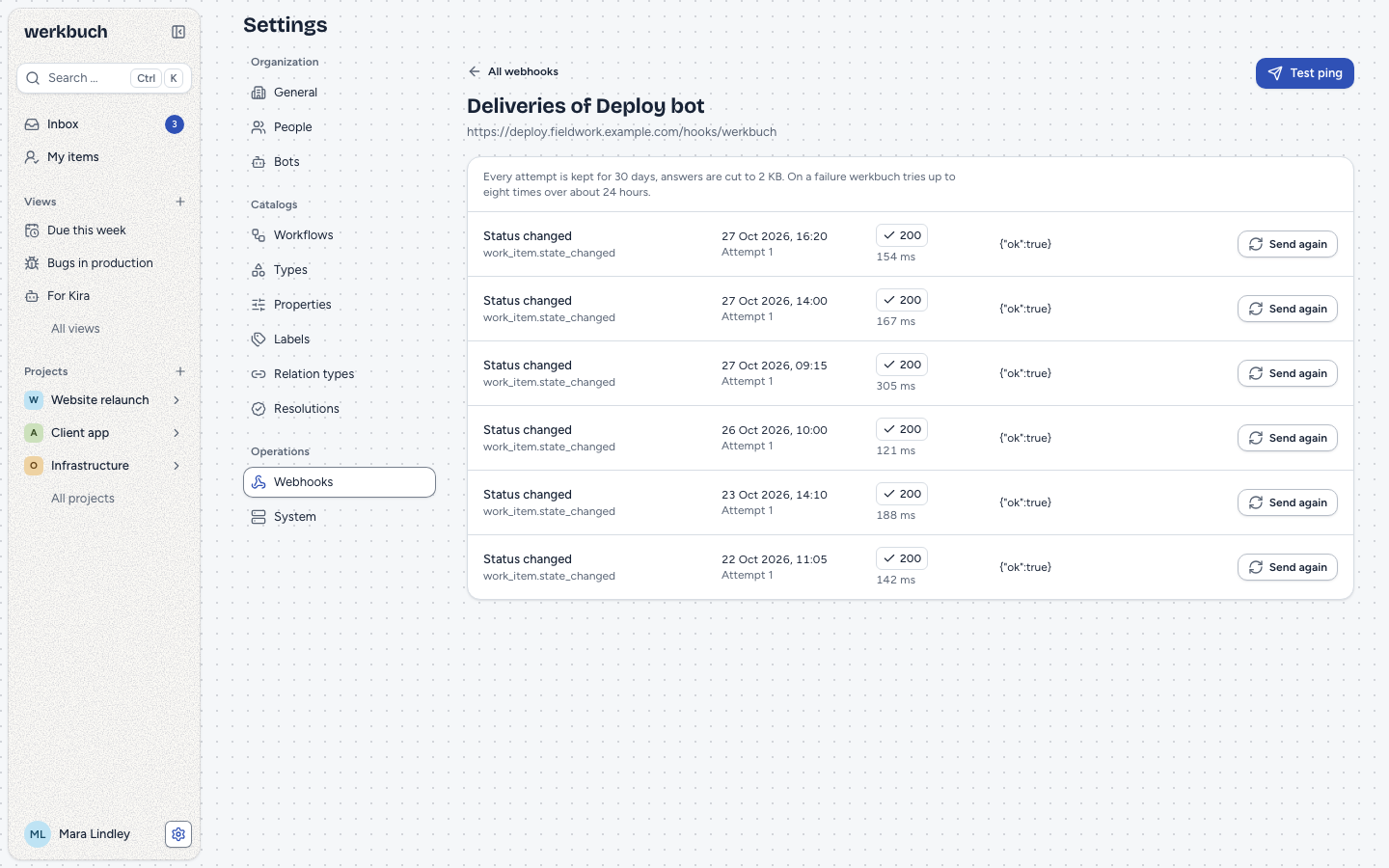
Deliveries on a webhook shows every attempt, newest first: event, time, attempt number, the status code or "No answer", duration and the first 2 KB of the answer (cut at a whole character; a compressed answer shows as its encoding and size, such as (gzip, 50914 bytes)). Without an answer, the reason shows instead:
| Reason | Meaning |
|---|---|
scheme | The URL is neither http nor https |
credentials | The URL has a user or password |
unresolvable | The name has no address, or the URL cannot be read |
private_address | One of the addresses of the name lies in a blocked network |
bot_access | Send again for a webhook whose bot no longer sees the project |
too_large | The answer was longer than 64 KB |
timeout | No answer within 10 seconds |
connection | The connection failed |
An error text masks user, password and query of every URL in it, but not the path: a receiver that carries its token in the path, as Slack and Discord do, shows it to org admins in the log. Deliveries and their attempts are deleted 30 days after their last change. A delivery still waiting 36 hours after its last attempt (its job got lost) becomes failed, but never while the queue webhooks still holds jobs that are due: after a worker was down, its waiting attempts still go out.
Test ping and send again
Test ping sends the event ping right away, also to a webhook that is switched off, and tells you what the receiver answered. Its body is {id, event: "ping", occurred_at, actor, project, data: {webhook: {id, name}}, changes: null}, signed like every delivery. A failed ping is not tried again.
Send again in the log sends the same body once more, with the same X-Werkbuch-Delivery, a new timestamp and the next attempt number, also to a webhook that is switched off, but never past a bot that lost access to the project. A success finishes the delivery, and a scheduled attempt that was already under way and fails afterwards neither undoes that nor counts towards switching the webhook off; a failure leaves its remaining scheduled attempts in place. The log has no Send again for a ping: send a new one.
Both wait for the receiver in the request, up to about 10 seconds plus the name lookup, and both are limited to six a minute per account (429 beyond).
Private networks
Before every attempt (pings too), werkbuch looks up the name, checks every IPv4 and IPv6 address of it, and sends only to an address it checked: a name that pointed to a public address when the webhook was saved and points to 127.0.0.1 later is not reached. One blocked address among several is enough to refuse. Blocked are private, loopback, link-local, carrier-grade NAT, documentation, benchmark, multicast and reserved networks, cloud metadata addresses (169.254.169.254, fd00:ec2::254, 100.100.100.200), IPv6 unique local, link-local and loopback addresses, and IPv4 addresses inside IPv6 (::ffff:127.0.0.1, NAT64 64:ff9b::, 6to4 2002::). When saving, werkbuch only refuses address literals and localhost in a blocked network; a name is checked at sending time, since DNS can change until then.
WEBHOOKS_ALLOW_PRIVATE=true allows targets in private networks (10.0.0.0/8, 172.16.0.0/12, 192.168.0.0/16, IPv6 unique local fc00::/7), carrier-grade NAT (100.64.0.0/10) and on the loopback (127.0.0.0/8, ::1, localhost), for a receiver in the same network, also as an IPv4 address inside IPv6 (::ffff:10.0.0.1). It never spares the lookup, and everything else stays blocked: link-local (169.254.0.0/16, fe80::/10, with the metadata address 169.254.169.254 in it), the metadata addresses 100.100.100.200 and fd00:ec2::254, 0.0.0.0/8 and ::, multicast, 240.0.0.0/4, documentation and benchmark networks.
Two limits: a NAT64 prefix of your own network (other than 64:ff9b::/96) cannot be recognized, and werkbuch never sends through a proxy (HTTP_PROXY and HTTPS_PROXY of the environment are ignored, since a proxy would resolve the name itself and get round the check).
Operation
Deliveries run on the queue webhooks. A worker has to listen on it; it waits up to 10 seconds per attempt for a slow receiver, so give webhooks a worker of its own when other queues share one, or a hanging receiver holds up live updates and notifications. werkbuch limits every name lookup of the process to 2 seconds and one attempt (RES_OPTIONS=timeout:2 attempts:1, unless the environment sets it), which applies to all lookups of PHP, not only webhooks. The log is pruned every hour by the scheduler. In the Docker Compose stack, that worker is the service queue-webhooks; which connections leave the stack and what WEBHOOKS_ALLOW_PRIVATE opens there is under Operations.
REST
All endpoints need the rights of an org admin. Reading needs the ability read, everything else write. The lists take filters and sorts like every list of the REST API: filter[project_id], filter[active], filter[bot_id] for the webhooks, filter[event], filter[kind], filter[succeeded] for the log.
Over MCP the tools webhooks and manage-webhooks do the same with the same rights; a test ping and manage-webhooks:redeliver count in the same 6 a minute. The secret that manage-webhooks:create and manage-webhooks:rotate-secret answer, and the address of a webhook with its query, end up in the history of the agent: create webhooks over REST or in the interface when that matters.
| Endpoint | Meaning |
|---|---|
GET /api/v1/webhooks | The webhooks, by name, in pages (cursor, per_page) |
POST /api/v1/webhooks | {name, url, project_id, events, bot_id, active}, all required (project_id and bot_id may be null). Answers 201 with {data, secret}: the only time the secret is shown besides rotate-secret |
GET /api/v1/webhooks/{id} | One webhook |
PUT /api/v1/webhooks/{id} | Replaces the webhook as a whole, same fields as creating |
DELETE /api/v1/webhooks/{id} | Deletes it with its log; 204 |
POST /api/v1/webhooks/{id}/rotate-secret | A new secret: {data, secret} |
POST /api/v1/webhooks/{id}/ping | A test ping; answers the attempt |
GET /api/v1/webhooks/{id}/deliveries | The log: attempts, newest first, in pages |
POST /api/v1/webhooks/{id}/deliveries/{delivery}/redeliver | Sends a delivery again; answers the attempt |
curl -X POST -H "Authorization: Bearer <token>" -H "Content-Type: application/json" \
  -d '{"name": "Deploy", "url": "https://deploy.example.com/hook", "project_id": null,
       "events": ["work_item.state_changed"], "bot_id": null, "active": true}' \
https://werkbuch.example.com/api/v1/webhooks{
"data": {
"id": "01m6c1d4f7h0k3m6p9r2t5w8yb",
"name": "Deploy",
"url": "https://deploy.example.com/hook",
"project_id": null,
"events": ["work_item.state_changed"],
"bot_id": null,
"active": true,
"disabled_at": null,
"failing_since": null,
"last_success_at": null,
"created_by": "01m6akw3g1r5t8v2x4z7b9d3fh",
"created_at": "2026-11-06T09:00:00.000000Z",
"updated_at": "2026-11-06T09:00:00.000000Z"
},
"secret": "whsec_…"
}disabled_at is set when the system switched the webhook off, failing_since is the first failure since the last success. An attempt in the log (and the answer of ping and redeliver) is {id, delivery_id, webhook_id, event, attempt, kind, status_code, duration_ms, response_excerpt, error, created_at}; kind is scheduled, manual (send again) or ping, status_code is null without an answer, and error is the reason from the table above with the first sentence of the error.
Field errors come as 422: url with an unknown scheme, a user or password, a host in a form that cannot be read or a private literal; events empty, not a list of names or with an unknown event; bot_id that names no active bot (a bot the webhook already has may have been deactivated since: the other fields stay changeable, and the webhook delivers nothing while the bot is inactive).
Agents
A webhook with a bot is the way to wake an AI agent. It gets:
bot.assignedandbot.mentionedof its bot,work_item.*andcomment.*of items the bot is assigned to when the event is sent (also the change that took the item away from it, and the deletion of an item it had),- and all of that only while the bot is active and sees the project: checked when the event is sent and again before every attempt. An agent removed from a private project hears nothing more of it.
Project, page and template events never go to a webhook with a bot. bot.assigned comes when someone else assigns an item to the bot (when creating, changing, in a bulk edit or from a template); a bot that takes an item itself gets none. The scenario: assign an item to the bot, the webhook bot.assigned reaches the agent with data.item, and the agent works on it over MCP with a token of its bot: whoami, work-items:get, then manage-comments:add and manage-work-items:transition. Over the REST API the same steps work for a script without an MCP client. Give the agent a token of its bot and a project membership, never a token of the default bot.