

Workflows
A workflow is the set of states an item moves through, and the rules for moving between them. Workflows belong to the organization: org admins manage them under Settings → Workflows, everyone else can read them there. Every project uses exactly one workflow, and several projects can share one.
States
A state has a name (up to 40 characters), one of seven icon shapes and a category. The order of the states is the order you give them in the editor; boards and lists show them that way. A workflow has at most 30 states.
The shapes are: dashed circle, circle, half filled, three quarters filled, pause, check mark and cross. The colour of the icon follows the category, so a state always looks like what it means.
Categories
The category tells werkbuch what a state means, whatever it is called. Open or closed, progress, resolutions and filters go by the category, not by the name.
| Category | Meaning |
|---|---|
| Backlog | Not planned yet. The item is open. |
| Unstarted | Planned, but not started. Open. |
| Started | In progress. Open. |
| Completed | Done. Closes the item, which gets a resolution. |
| Canceled | Called off. Closes the item, which gets a resolution. |
Rules for saving
werkbuch checks a workflow every time it is saved and refuses one that breaks a rule:
- It has exactly one start status. New items start there.
- It has at least one Completed state, so work can be finished.
- Every state can be reached from the start status. A state nobody can get to would collect nothing.
The editor checks the same rules while you work. It lists every finding with a way to fix it, marks the rows concerned as "Not reachable", and does not send a workflow with findings.
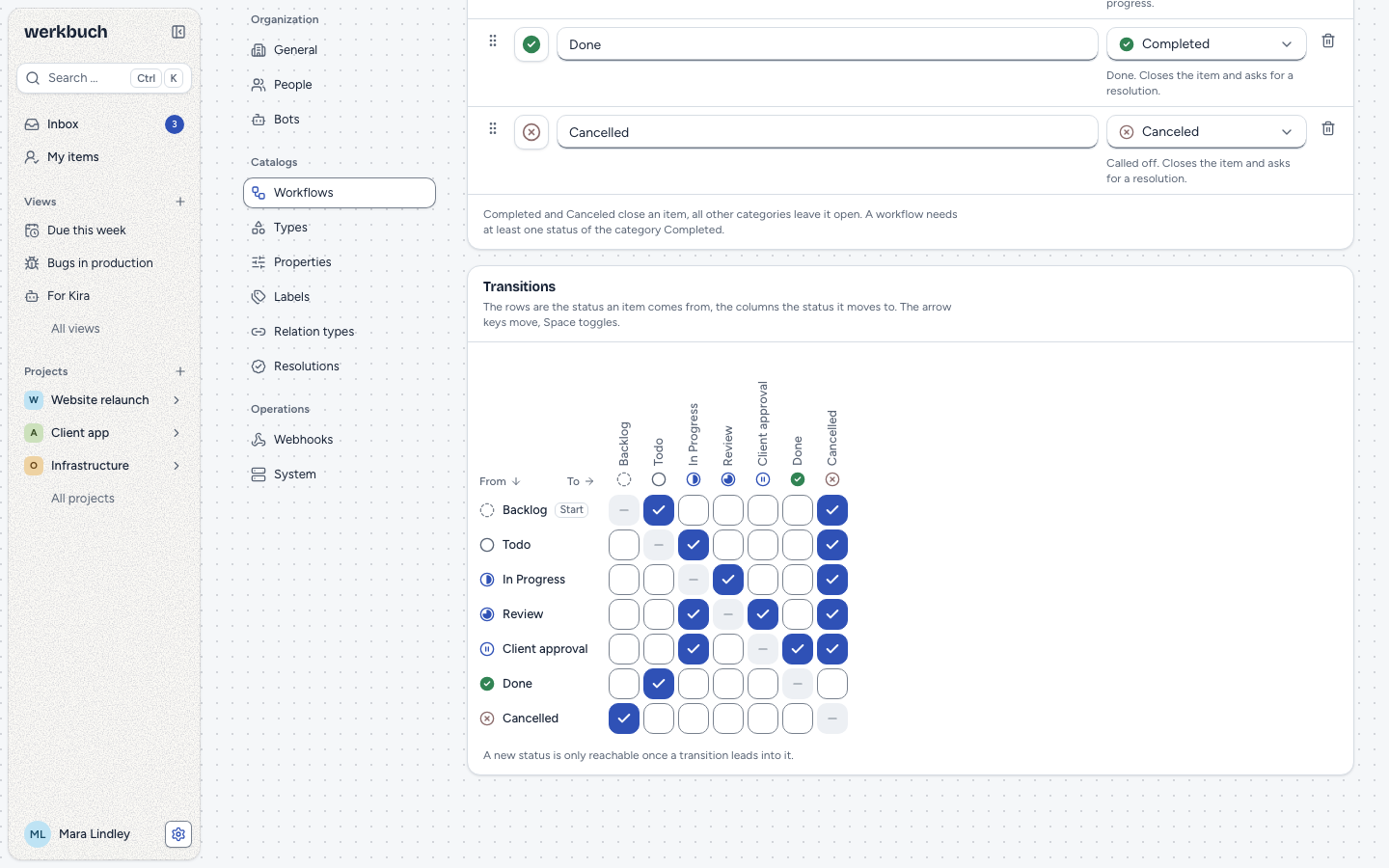
An example from the demo data: the workflow "Agentur-Freigabe" (agency approval) leads from Backlog over Todo, In Progress, Review and Kundenfreigabe (client approval) to Done, and from most states to Cancelled. Take the transition In Progress → Review out of its matrix, and Review can no longer be reached from the start status, and with it neither Kundenfreigabe nor Done. werkbuch names all three and keeps the workflow as it was.
Free or matrix
A workflow is either free or has a transition matrix.
- Free: every state can follow every other state. The default workflow is free.
- Matrix: only the pairs you allow (from → to) are possible. The editor shows a grid with one row per "from" state and one column per "to" state; each cell is one transition. When you switch Free transitions off, the matrix starts with every pair allowed, so you only take away what you do not want.
Staying in the same state is always allowed. The rule applies everywhere alike: in the interface and over the REST API, for automations and runs of templates, and over MCP. An item created directly in another state goes through the same check as a transition from the start status.
The default workflow
Exactly one workflow is the default. A new project gets it unless you choose another one. werkbuch ships the workflow "Standard" as the default: free, with Backlog (Backlog), Todo (Unstarted), In Progress and Pending (both Started), Done (Completed) and Cancelled (Canceled), starting in Backlog.
To make another workflow the default, switch Default workflow on in its editor; the old default loses the mark. You cannot simply switch it off, because one workflow is always the default.
Changing a workflow in use
New states and new transitions apply at once, in every project that uses the workflow. Duplicate starts a new workflow as a copy of an existing one, with new state ids; the copy is never the default.
The workflow of a project
Project admins switch the workflow of their project under Project settings → Workflow: choose the new workflow, then Switch workflow … and confirm.
Without items it is a plain confirmation. Otherwise the dialog lists every state that holds items, with their number and a proposal (the state of the same name, else the first one of the same category), and says what the switch does to them: closed items that land in an open state lose their resolution, open ones that land in a closed state get its default. You confirm once every state has its target. The same question comes when you save a workflow without a state that still holds items (Replace statuses): the states that stay and the new ones are the targets. werkbuch moves the items at once, deliberately without the transition rules, and their history names the person who did it. Nobody is notified about these moves. When auto-close is on, the dialog also says which Canceled state it takes from then on, or that it is switched off.
Delete
A workflow can only be deleted while no project uses it; archived projects count too, and so does a project being deleted until it is gone for good. The default workflow can never be deleted. The interface says which projects still use a workflow, and the API answers 409 with reason: in_use and their identifiers in projects; its detail marks a project that is being deleted.
REST
Reading needs a token with read, changing one with write. Every account may read the workflows; only org admins create, change and delete them.
| Request | Answer |
|---|---|
GET /api/v1/workflows | The list, with states and transitions. |
GET /api/v1/workflows/{id} | One workflow with its states and transitions. |
POST /api/v1/workflows | 201 with the new workflow. |
PUT /api/v1/workflows/{id} | 200 with the workflow. |
DELETE /api/v1/workflows/{id} | 204. |
PUT /api/v1/projects/{project}/workflow | 200 with the project. |
GET /api/v1/state-usage?project={project} or ?workflow={id} | How many items stand in each state. |
Create a workflow
POST and PUT take the whole workflow; a missing field is a 422 at that field. The states come in their order. A new state carries an id you choose (any text up to 64 characters, such as draft, but not starting with new:, which werkbuch keeps for states sent without an id), and initial_state_id and transitions refer to it. werkbuch gives every new state a ULID and answers with those.
curl -X POST https://werkbuch.example.com/api/v1/workflows \
  -H "Authorization: Bearer <token>" \
  -H "Content-Type: application/json" \
-d @workflow.json{
"name": "Content",
"description": "Draft, review, published.",
"is_default": false,
"is_free": false,
"initial_state_id": "draft",
"states": [
{ "id": "draft", "name": "Draft", "icon": "dashed", "category": "backlog" },
{ "id": "review", "name": "Review", "icon": "three-quarter", "category": "started" },
{ "id": "published", "name": "Published", "icon": "check", "category": "completed" },
{ "id": "dropped", "name": "Dropped", "icon": "cross", "category": "canceled" }
],
"transitions": [
["draft", "review"], ["review", "draft"], ["review", "published"],
["draft", "dropped"], ["review", "dropped"]
]
}The answer (201, shortened):
{
  "data": {
    "id": "01m68z8s6ma9xexr0yx9p6b91v",
    "name": "Content",
    "is_default": false,
    "is_free": false,
    "initial_state_id": "01m68z8s6ng75dykjw0x6tgc6n",
    "states": [
      { "id": "01m68z8s6ng75dykjw0x6tgc6n", "name": "Draft", "icon": "dashed", "category": "backlog", "position": 0 },
      { "id": "01m68z8s6ng75dykjw0x6tgc6p", "name": "Review", "icon": "three-quarter", "category": "started", "position": 1 }
    ],
    "transitions": [
      ["01m68z8s6ng75dykjw0x6tgc6n", "01m68z8s6ng75dykjw0x6tgc6p"]
    ]
  }
}
To change a workflow, send it whole with PUT. States that keep their ULID stay with their items, states you leave out are removed, and a state with any other id is a new one. The icon shapes are dashed, circle, half, three-quarter, pause, check and cross.
A workflow that cannot be saved
A workflow that breaks a rule is refused with 422 and reason: invalid_workflow, and nothing is saved. errors has a sentence per finding under its code, issues names the states by the ids you sent. The codes are no_initial_state, no_completed_state and unreachable_state.
{
  "type": "urn:werkbuch:problem:invalid_workflow",
  "title": "Validation failed",
  "status": 422,
  "detail": "The workflow cannot be saved like this.",
  "reason": "invalid_workflow",
  "errors": {
    "no_completed_state": ["The workflow needs at least one status of the category Completed."],
    "unreachable_state": ["Review cannot be reached from the start status."]
  },
  "issues": [
    { "code": "no_completed_state" },
    { "code": "unreachable_state", "state_id": "review" }
  ]
}
Remove a state that holds items
A PUT that leaves out a state some items still stand in (in any project of the workflow, archived items and projects included) needs a target for it in state_mapping: {"<removed state ULID>": "<target>"}. The target is any state of the body, named the way the body names it: the ULID of a state that stays, or the id you gave a new one. Without a target the answer is 409 with reason: state_in_use, the states concerned in states, and nothing is saved:
{
  "type": "urn:werkbuch:problem:state_in_use",
  "title": "Conflict",
  "status": 409,
  "detail": "Removed statuses with items have no new status.",
  "reason": "state_in_use",
  "states": [
    { "state_id": "01m6akx71dkvjjrrvepyrpwdtc", "name": "Kundenfreigabe", "items": 1 }
  ]
}
With the target, werkbuch saves the workflow and moves the items in the same request, without the transition rules. A closed item that lands in an open state loses its resolution, an open one that lands in a closed state gets the default of the category; an archived item stays archived. Every item gets a work_item.state_changed in its history with the reason state_removed and the names of both states. state_mapping only takes removed states: a key that is a state staying in the workflow, or no state of it at all, is a 422 at state_mapping.<id>, and so is a target that is not in the body.
Items per state
GET /api/v1/state-usage?project=WEB counts the items of a project per state, ?workflow=<id> those of every project of the workflow you can see. Archived items count; states without items are left out. The interface asks it before it offers the mapping.
{
  "data": [
    { "state_id": "01m6akx71bcm10xw328kxkw7ak", "items": 4 },
    { "state_id": "01m6akx71dkvjjrrvepyrpwdtc", "items": 1 }
  ]
}
Switch the workflow of a project
The project is addressed by its identifier or its ULID. mapping maps states of the old workflow to states of the new one ({"<old state id>": "<new state id>"}). Every state the items of the project are in (archived ones included) needs a target; one without is a 422 at mapping.<state id>, and states lists the states that lack one, with their items. A key that is no state of the old workflow, or a target that is no state of the new one, is a 422 as well. A project without items takes an empty mapping. The items move in the same request, as above, with the reason workflow_changed.
curl -X PUT https://werkbuch.example.com/api/v1/projects/WEB/workflow \
  -H "Authorization: Bearer <token>" \
  -H "Content-Type: application/json" \
  -d '{"workflow_id": "01m68z8s6ma9xexr0yx9p6b91v", "mapping": {}}'
PATCH /api/v1/projects/{project} does not switch the workflow: a different workflow_id there is a 422. Switching takes the rights of a project admin.