

Automations
Automations do small, recurring steps of a project for you. Every project has five. Four are off at the start, "Link referenced items" is on. Admins of the project switch them in the project settings under Automations (/projects/WEB/settings/automations); the switch acts at once.
They act as the default bot "Automation", keep to the transitions the workflow allows and appear in the history with their reason, such as "Automation: auto-archive".
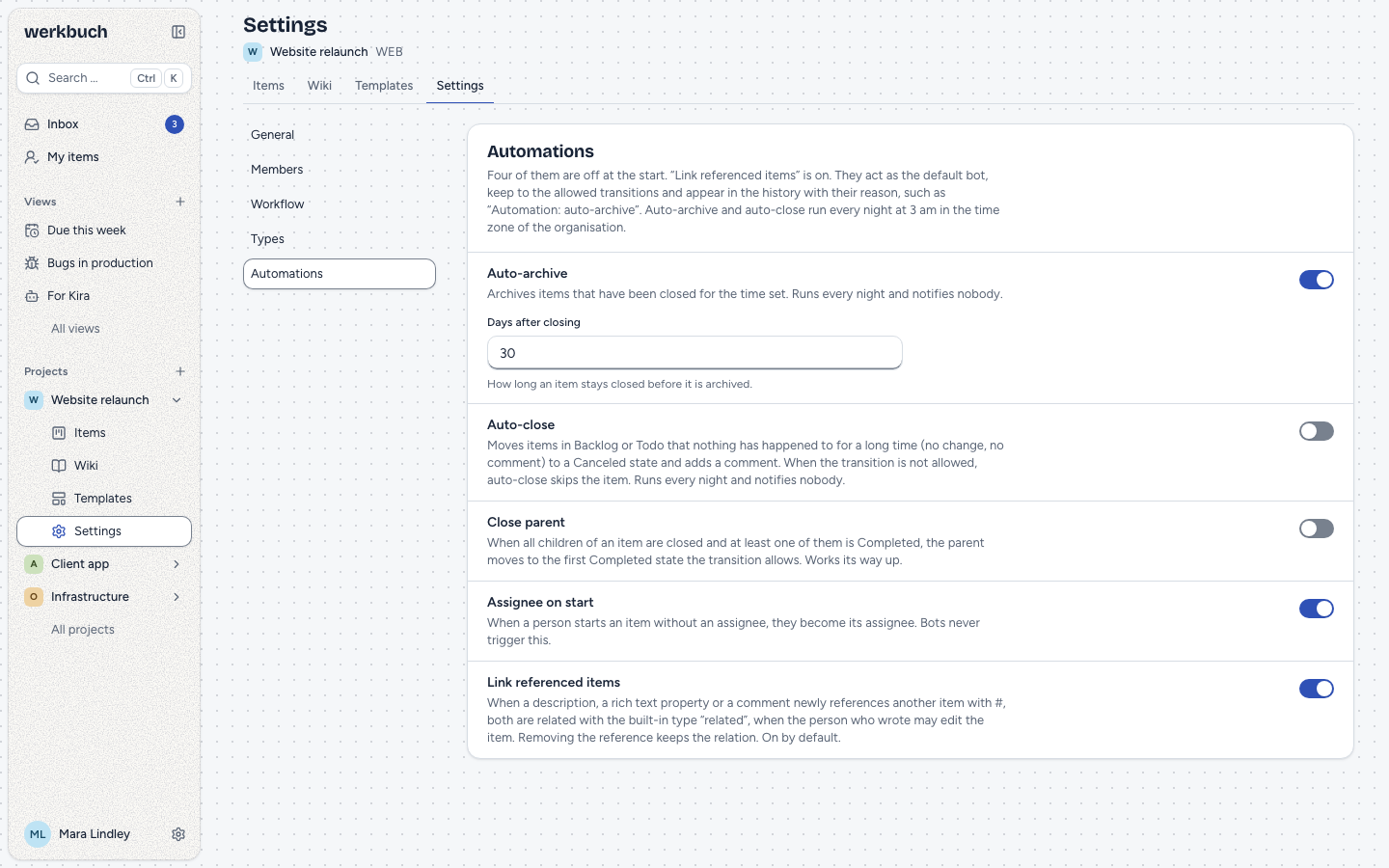
The five automations
| Automation | What it does | When |
|---|---|---|
| Assignee on start | A person who starts an item without an assignee becomes its assignee. | When the item moves |
| Close parent | When all children of an item are closed, the parent closes too. | When a child moves |
| Auto-archive | Archives items that have been closed for a number of days (30 by default). | Every night |
| Auto-close | Cancels items that have rested in Backlog or Todo for a number of days (90 by default) and says so in a comment. | Every night |
| Link referenced items | Relates an item to the items its texts newly reference with #. On by default. | After saving |
Assignee on start
When a person moves an item that has no assignee from a state that is not started (Backlog, Unstarted, or a closed state when the item opens again) into a Started state, they become its assignee and watch it. This also happens when someone creates an item directly in a Started state.
- Only people. Bots never trigger it, and neither does a run of a template.
- Only who may take the work: a member of the project, or a person who is an org admin.
- An assignee you choose wins. A change that sets the assignee together with the state (a bulk change, for example) keeps the assignee you chose, also "nobody" (over the API
assignee_id: nullin the same patch as the state). - The person does not get the notification "Assigned" about themselves.
Close parent
When a child moves into a Completed or Canceled state, werkbuch looks at all children of its parent, archived ones included. When all of them are closed and at least one of them is Completed, the parent moves to the first Completed state of its workflow (in the order of the workflow) that the transition allows. When none is allowed, the parent stays open. When all children were canceled, the parent stays open too: nothing was done. A child created directly in a closed state counts the same way.
The parent moves in the same moment as the child; the history shows both. An archived parent stays as it is. The rule works its way up, at most five levels; with two levels of items, that is one step today.
Auto-archive
Every night, auto-archive archives the items of the project that have been in a Completed or Canceled state for at least the set number of days (1 to 3650), counted from the moment they were closed. Archived items stay readable and searchable; Restore brings an item back.
Auto-close
Every night, auto-close moves the items in Backlog or Unstarted (Todo) that nothing has happened to for the set number of days (1 to 3650) into the Canceled state you choose, and adds a comment as the default bot: "Closed automatically: no activity for 90 days." (in the language of the organization).
- Activity is the last change of the item or its last comment, whichever is later. An item with an ongoing discussion is not closed.
- The transition decides. When the workflow does not allow the move from the item's state to the chosen state, auto-close skips the item and leaves no comment. The settings say which states it skips.
- A Canceled state is needed. In a workflow without a state of the category Canceled, auto-close cannot be switched on; org admins can add one.
Link referenced items
When a description, a rich text property or a comment of an item newly references another item with #, werkbuch relates both with the built-in relation type "related" (it reads "relates to"). The automation is on by default, in every project, also in those that existed before; switch it off in the project settings and the setting is saved for the project.
- Newly references means: for the description and the rich text properties, the reference was in none of them before (they count together: a reference the description has already relates nothing when it comes into a rich text property); for a comment, it was not in that comment before. Saving the same text again, or a text that keeps a reference it already had, relates nothing. An item that is already related to the other one with the built-in type, in either direction, gets no second relation. A relation you removed by hand does not come back from saving the text again.
- What counts: the description, the rich text properties and the comments (new and edited) of an item. Wiki pages relate nothing, and an item never relates to itself.
- Who relates: only a person who may change the item that carries the text (the right to edit items, the same a relation by hand needs). A viewer, or somebody outside a public project, who references an item in a comment relates nothing. The other item may lie in another project, as far as the person who wrote the text sees it. The automation of the project of the item that carries the text decides.
- Templates: every run of a template whose texts reference an item relates the new item to it. A run by hand checks the rights of the person who started it, a scheduled run those of the default bot "Automation".
- Removing the reference keeps the relation. Remove the relation itself in the item's relations.
- An archived item may be the other end. An archived item, or an item in an archived project, relates nothing through its own texts.
- After saving. The relation comes a moment after the save, not with it; the item page loads it by itself.
- Notifications follow the usual rules: watchers of both items are told that the relations changed; the person who wrote the text is not. Watchers of the item that carries the text are told twice: of the change of the text, and of the new relation.
At night
Auto-archive and auto-close run every night at 03:00 in the time zone of the organization, also on the nights the clocks change. "For 30 days" means 30 × 24 hours before the run. When a night was missed (maintenance), the next one does the work: the items still meet the threshold.
- Archived projects and projects being deleted are left out.
- Nobody is notified. Neither the move nor the comment of the night writes a notification, and neither does a parent the move closes through "close parent"; the history of the item shows all of it.
php artisan app:run-automations --nowruns both at once, for example after maintenance;--project=<ULID>narrows it to one project.
When the workflow changes
Auto-close follows the workflow of the project. When an admin changes the workflow, auto-close takes the state its Canceled state is mapped to, when that is a Canceled state; otherwise the first Canceled state of the new workflow; and when the new workflow has none, auto-close is switched off. The dialog Change workflow says beforehand what will happen. The same applies when the Canceled state is removed from the workflow or moved into another category.
In the history
Every step of an automation is an entry of the default bot "Automation" with its reason: "Automation: assignee on start", "Automation: close parent", "Automation: auto-archive", "Automation: auto-close" or "Automation: link referenced items". Over the API, the history entry has via automation and the reason as a key in reason (assign_on_start, close_parent, auto_archive, auto_close, link_references). The relation made by "link referenced items" shows in the history of both items as a relation the default bot added; the entry does not name the person who wrote the text. The person whose move set off a step (assignee on start, close parent) is not notified about it.
Permissions
- Admins of the project (and org admins) switch automations and change their settings, also in an archived project.
- Everyone who sees the project reads them; members and viewers see the settings read-only.
REST
Reading needs a token with read, changing one with write. The list always has the five automations; one that was never saved reads as the key starts: off with its defaults, link_references on.
| Request | Answer |
|---|---|
GET /api/v1/projects/{project}/automations | The five automations of the project. |
PUT /api/v1/projects/{project}/automations/{key} | 200 with the automation; enabled (required) and settings. |
The keys are assign_on_start, close_parent, auto_archive, auto_close and link_references (no settings). Switching link_references on when it has no stored row changes nothing; switching it off stores a row. settings holds days for auto-archive and auto-close (a whole number from 1 to 3650, as a JSON number) and state_id for auto-close (a Canceled state of the workflow of the project, needed to switch it on). A setting you do not send keeps its value; other keys are ignored.
curl -X PUT https://werkbuch.example.com/api/v1/projects/APP/automations/auto_close \
  -H "Authorization: Bearer <token>" \
  -H "Content-Type: application/json" \
-d '{"enabled": true, "settings": {"days": 60, "state_id": "01m6akx71bcm10xw328kxkw7cz"}}'{
"data": {
"id": "01m6d5k2h3j4k5n6m7n8p9q0rs",
"project_id": "01m6akx72yptw2aw6n30m5fg0a",
"key": "auto_close",
"enabled": true,
"settings": { "days": 60, "state_id": "01m6akx71bcm10xw328kxkw7cz" }
}
}An unknown key is a 404; someone who is no admin of the project gets 403 with "Only admins of the project change automations."; a wrong setting is a 422 at settings.days or settings.state_id, and settings must be an object. A change writes the event automation.updated; saving the same values again changes nothing.